
Syncrify

| Developer: | Daniel Czewski's Plugins |
| Category: | Virtual Devices and Scenes |
| Github: | Github Repo |
| Assistance: | Get help! Check the online documentation |
| Plugin ID: | com.searchcz.syncrify |
| Latest release: | v1.0.4 released on Nov. 19, 2026 |
| Release downloaded: | 11 times |
| Requires: | Indigo v2024.2.0 or higher |
| (Check the Releases tab below for older releases that may have different requirements) | |
| Download latest release |
Syncrify
Your KeypadLinc buttons. First-class Indigo devices. Synchronized.
No triggers needed.
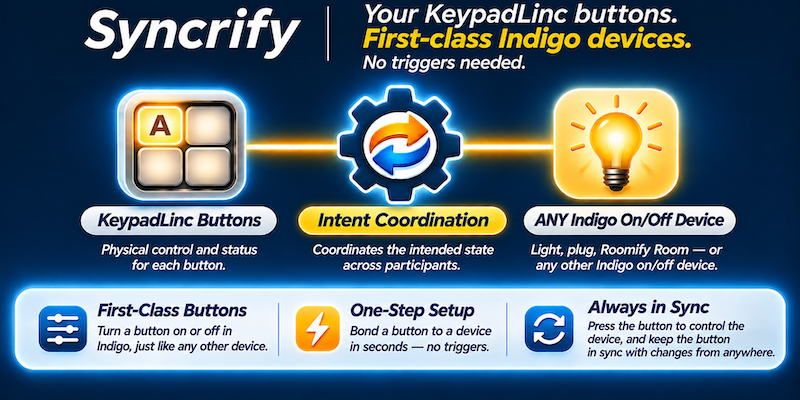
Syncrify gives you the ability to use your Insteon KeypadLinc accessory buttons just like any other first-class Indigo device — and makes it remarkably simple to put those buttons in control of the devices you choose.
A button can control a light, a plug, a Roomify Room, or just about any other Indigo on/off device. No chains of triggers to build, debug, or maintain.
Three participants. One synchronized relationship.
KeypadLinc Button
Your physical button becomes a first-class Indigo device. Turn it on or off in Indigo, just like any other device. Put it on a Control Page. See its status at a glance throughout Indigo.
Bond
A logical Indigo device that represents the relationship between the physical button and the device it controls. Syncrify uses the Bond to coordinate state across all participants.
Controlled Device
A light, plug, Roomify Room, or any other Indigo on/off device you want the button to operate.
What Syncrify does for you
1. First-class buttons
Each configured KeypadLinc accessory button gets its own Indigo device. Use it in Control Pages, actions, triggers, and anywhere else Indigo accepts a device.
2. One-step setup
Syncrify can scan your Indigo setup, find your KeypadLinc devices, and create the necessary Bond devices for their configured accessory buttons. Then simply choose the Indigo device you want each button to control. No need to build a collection of ON and OFF triggers.
3. Always in sync
Press the physical button and the controlled device responds. Change the controlled device somewhere else in Indigo, and the physical button follows.
The button isn't just a controller. It's a status indicator, too.
Your buttons. Your devices. Your way. No triggers needed.
How it works
Syncrify creates a logical Bond for each configured KeypadLinc button. Each Bond represents the relationship between one physical button and its associated Indigo device.
Changes can originate from the keypad, the Bond, or the controlled device. Syncrify recognizes the relevant changes and coordinates the necessary updates to keep the participants aligned.
Keypad support
Syncrify recognizes the configured button count of each KeypadLinc:
- 6-button KeypadLinc: Buttons B3–B6.
- 8-button KeypadLinc: Buttons B2–B8.
The plugin uses the keypad configuration to determine which accessory buttons are available for bonding.
Feedback-loop prevention
Bidirectional synchronization requires care: an update sent by Syncrify must not be mistaken for a new, independent request to change state.
Syncrify tracks synchronization obligations so that updates from one participant can be recognized as confirmations of an instruction, rather than treated as new intent. This prevents repetitive command loops while allowing changes to originate from any participant.
Current development status
Syncrify has been tested with multiple KeypadLinc devices and associated Indigo devices.
Current testing includes:
- Nine KeypadLinc devices.
- 35 logical Bonds.
- Keypad-to-Bond synchronization.
- Bond-to-keypad synchronization.
- Bound-device-to-Bond synchronization.
- Bidirectional propagation without feedback loops.
Getting Started
Syncrify is an Indigo Domotics plugin. Development and documentation are ongoing.
| Released on: | Nov. 19, 2026 |
| Requires: | Indigo v2024.2.0+ |
| Downloaded: | 11 times |
| Download this release | |
Resolves
File "plugin.py", line 730, in insteonCommandReceived
type: int() argument must be a string, a bytes-like object or a real number, not 'NoneType'
| Released on: | Nov. 18, 2026 |
| Requires: | Indigo v2024.2.0+ |
| Downloaded: | 15 times |
| Download this release | |
Turns out ON and OFF are not the only Bond commands that need to be accommodated. TOGGLE comes in as a separate command and needed code to address that.
| Released on: | Nov. 17, 2026 |
| Requires: | Indigo v2024.2.0+ |
| Downloaded: | 15 times |
| Download this release | |
First Release ... makes configuration and use of keypadlinc buttons quick and easy.