
Roomify

| Developer: | Daniel Czewski's Plugins |
| Category: | Lighting |
| Github: | Github Repo |
| License: | Other |
| Assistance: | Get help! Check the online documentation |
| Plugin ID: | com.searchcz.roomify |
| Latest release: | v1.6.1 released on Sept. 10, 2026 |
| Release downloaded: | 8 times |
| Requires: | Indigo v2024.2.0 or higher |
| (Check the Releases tab below for older releases that may have different requirements) | |
| Download release v1.5.0 |
Smart Rooms. Adaptive Lighting.
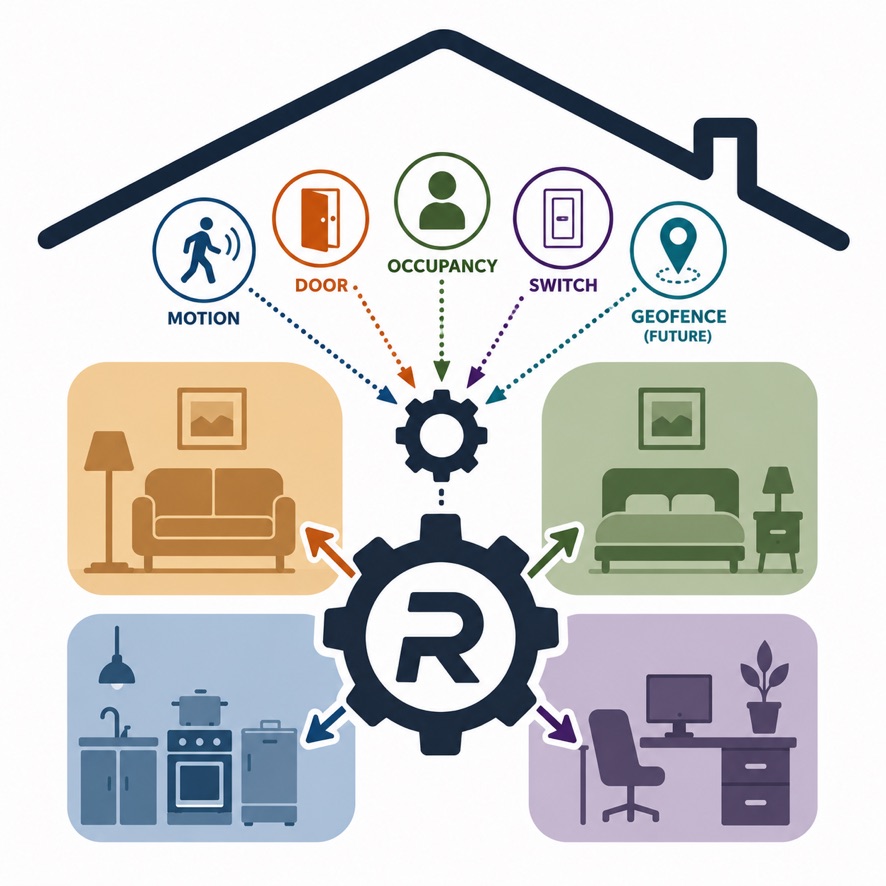
**You already know how automated lighting works.
Someone walks into a room. The lights come on. Nobody moves for a while. The lights go off.
Now imagine if it were smarter. Imagine automated lighting that actually understands the room.
Imagine lighting that understands that a kitchen has different needs than a living room or bedroom.
That the lighting that feels right at 8 PM might be completely wrong at 2 AM.
That a room may have several lights, each with a different role, and that they should be coordinated rather than treated as separate devices.
That motion isn’t the only sign that someone is there. A television turning on, a door opening, or other activity can also tell you something about what’s happening in the room.
And imagine that all of those signals aren’t simply triggering predetermined actions.
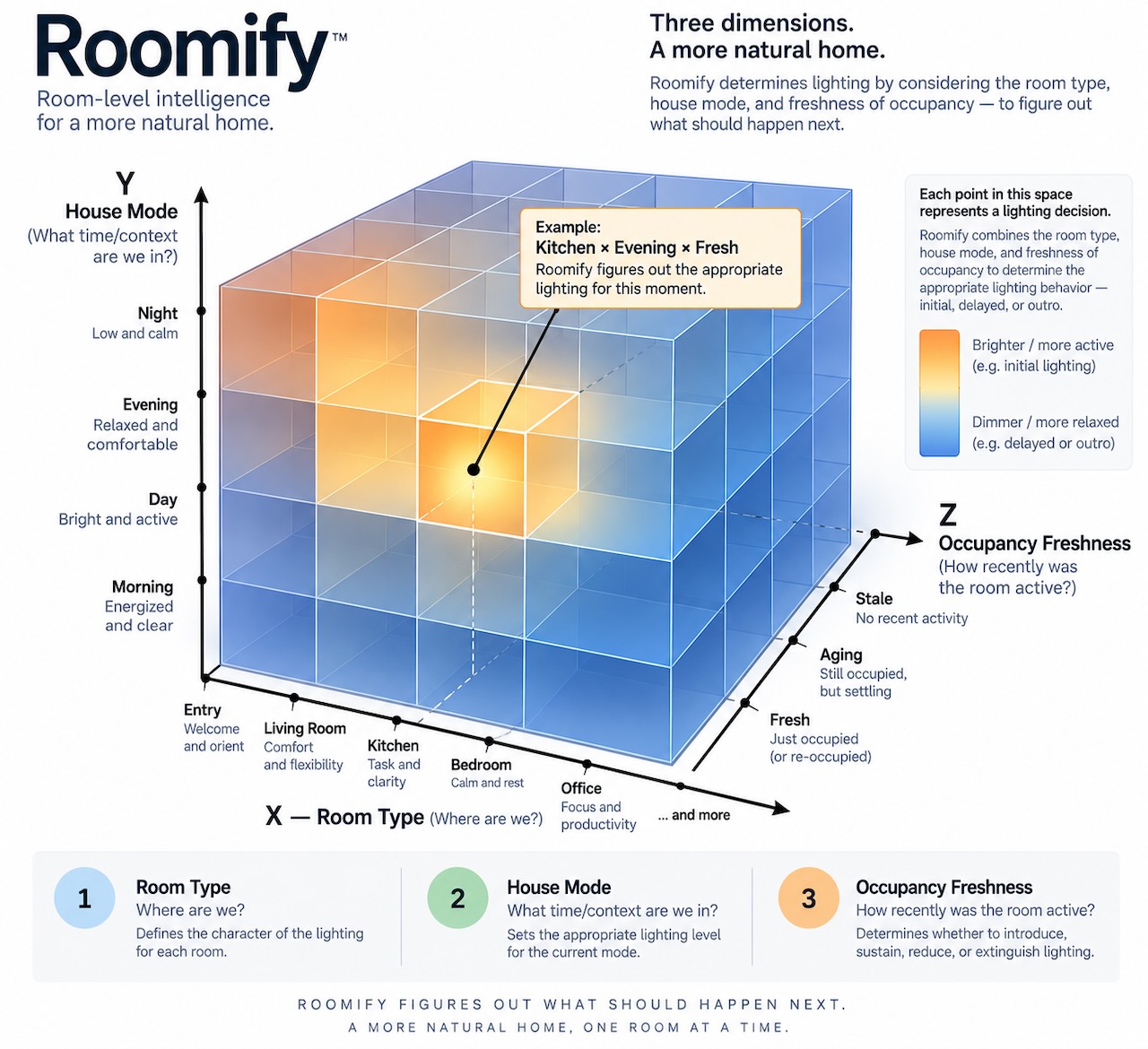
Changes in a room tell a story.
Roomify listens, providing the brains to interpret that information and make lighting decisions based on the place, the time, and the circumstances.
The result isn’t simply automated lighting.
It’s lighting that responds to what is actually happening in the room.
And Roomify doesn’t need to take over to do it.
It works alongside the lighting systems and automations you’ve already built—and alongside the person who lives there. Your existing systems can continue doing what they do. You remain free to intervene when you want to.
In fact, that’s the point.
The switch and the voice command should be the exception, not the rule.
Roomify helps make your home responsive enough that you don’t have to tell it what to do every time you walk into a room.
Start with one room. See what happens.
⸻
Documentation Set
| Released on: | Sept. 10, 2026 |
| Requires: | Indigo v2024.2.0+ |
| Downloaded: | 8 times |
| Download this release | |
Roomify 1.6.1
Reliable Outcomes
Roomify 1.5 became better at deciding when to retain or resume automation authority.
Roomify 1.6 goes a step further: it is better at ensuring that the lighting outcome Roomify intended is actually achieved.
Why 1.6 Was Needed
Roomify operates on information reported by the devices and systems that connect your home to Indigo.
That information is useful, but it isn’t necessarily a perfect representation of what is happening physically.
A device may report a change later than it actually occurred. In some circumstances, a reported state may even temporarily differ from the device’s actual state.
This creates an important distinction:
The state reported by a device is not necessarily the same thing as the actual state of the device.
For an automation system, that distinction matters.
Roomify may issue an instruction and receive a report that appears to contradict the intended outcome. The report may represent a genuine change, a delayed report of an earlier state, or simply an inaccurate observation.
Roomify therefore cannot treat every device report as definitive evidence that the physical world has changed—or that someone has taken control.
Version 1.6 improves Roomify’s ability to operate in that uncertainty.
When Roomify still has authority and the evidence indicates that an automated lighting outcome has not been achieved, it can confirm the result and correct the lighting when necessary.
The goal is not to ignore device reports. It is to interpret them appropriately, in context, and to avoid abandoning an automation based on imperfect information.
What’s New
Automatic Confirmation and Correction
Roomify can now automatically confirm that lighting changes have reached their intended state and correct a device when necessary.
This feature is enabled by default and can be disabled in the plugin configuration.
When Roomify has issued a lighting instruction and remains in control of the room, an unexpected device state no longer necessarily means the automation must be abandoned. Roomify can verify the room’s state and, when appropriate, correct the discrepancy.
More Reliable Lighting Execution
Roomify now spaces lighting instructions to reduce command congestion when multiple devices are being controlled at once.
This helps prevent rapid bursts of commands from overwhelming the underlying lighting system and improves the consistency of multi-device lighting changes.
Better Recovery from Device Divergence
A device that fails to follow an automation instruction does not necessarily represent a change in homeowner intent.
Roomify can now do a better job of maintaining the intended room state when an individual device temporarily diverges from it, while continuing to respect genuine interventions.
This builds on the authority and deferral improvements introduced in Roomify 1.5.
The Goal of 1.6
The central goal of this release is simple:
Make the intended outcome more reliable.
Roomify should figure out what should happen next, respect you when you choose to intervene, and—when you haven’t—do a better job of making the automation actually happen.
Version 1.5 made Roomify more confident about when to keep control.
Version 1.6 makes it more capable of following through.
The result is a Roomify that is better able to understand the room, retain the right authority, and reliably deliver the lighting you’ve asked it to provide.
| Released on: | Aug. 21, 2026 |
| Requires: | Indigo v2024.2.0+ |
| Downloaded: | 25 times |
| Download this release | |
Roomify is now better at retaining automation authority when a device or two misbehaves, and more confident at resuming authority after a room Tuens off.
Bottom line: your roomify automations remain active, as they should, unless you or some other intentional automation disrupts them. (And only until shortly after the room is turned off)
| v1.4.0 | Requires Indigo v2024.2.0+ | Released July 10, 2026 | Improved Authority Negotiation via Conversation Tracing |
| Released on: | July 10, 2026 |
| Requires: | Indigo v2024.2.0+ |
| Downloaded: | 39 times |
| Download this release | |
Roomify 1.4.0
Adaptive Conversation Tracing
When Roomify asks a device to change state, the interaction rarely ends with a single response. Many devices report their progress over a series of messages as they react to the request, update their state, or complete a fade. Roomify treats this entire exchange as a conversation.
A conversation begins when Roomify issues an intent. Until the device first reports compliance with that intent, every subsequent report is presumed to belong to the original conversation, regardless of how many intermediate states are reported or how long the device takes to settle.
Once compliance has been observed, Roomify begins evaluating subsequent reports to determine whether they are simply continuing the existing conversation or represent the beginning of an entirely new one.
To make that determination, Roomify 1.4.0 introduces adaptive conversation tracing. As devices respond to automation, Roomify learns each device’s normal response cadence. Reports that continue to arrive within that learned cadence are treated as part of the existing conversation. Reports that arrive significantly outside that cadence are interpreted as evidence that the device has begun participating in a different conversation.
That new conversation may have been initiated by a person, HomeKit, Alexa, Indigo, or another automation system. Rather than competing for control, Roomify listens. It recognizes that the conversation has changed and gracefully surrenders authority for the affected room, allowing the new conversation to proceed without interference.
By distinguishing between reports that belong to an existing conversation and reports that initiate a new one, Roomify significantly reduces false interruption detection while cooperating more naturally with people and other automation systems.
| v1.3.3 | Requires Indigo v2024.2.0+ | Released July 7, 2026 | Bug Fix! Please update if you are running v 1.3.2 |
| Released on: | July 7, 2026 |
| Requires: | Indigo v2024.2.0+ |
| Downloaded: | 34 times |
| Download this release | |
Startup error in 1.3.2 prevents device initialization. Apologies to anyone running 1.3.2 and please update.
| Released on: | July 6, 2026 |
| Requires: | Indigo v2024.2.0+ |
| Downloaded: | 52 times |
| Download this release | |
to coordinate data with Securify plugin
| Released on: | June 26, 2026 |
| Requires: | Indigo v2024.2.0+ |
| Downloaded: | 40 times |
| Download this release | |
Tring a new version number o this path, hoping Indigo will pick this up and publish it.
Fixes a syntax error in the heartbeat process that could result in rooms failing to resume previously suspended automations.
| Released on: | June 25, 2026 |
| Requires: | Indigo v2024.2.0+ |
| Downloaded: | 20 times |
| Download this release | |
I noticed an error in my log file this morning, pertaining to the re-authorization of room automations once a room becomes off and vacant. The primary mechanism for this was working fine, but the failover executed in the heartbeat thread was failing.
Roomify Error Error in plugin execution runConcurrentThread:
  File "plugin.py", line 2836, in runConcurrentThread
  File "plugin.py", line 2605, in considerReauthorization
type: 'Dict' object is not callable
v1.1.2 resolves this.
| Released on: | June 25, 2026 |
| Requires: | Indigo v2024.2.0+ |
| Downloaded: | 21 times |
| Download this release | |
I noticed an error in my log file this morning, pertaining to the re-authorization of room automations once a room becomes off and vacant. The primary mechanism for this was working fine, but the failover executed in the heartbeat thread was failing.
Roomify Error Error in plugin execution runConcurrentThread:
  File "plugin.py", line 2836, in runConcurrentThread
  File "plugin.py", line 2605, in considerReauthorization
type: 'Dict' object is not callable
v1.1.2 resolves this.
| Released on: | June 23, 2026 |
| Requires: | Indigo v2024.2.0+ |
| Downloaded: | 54 times |
| Download this release | |
Adds four system-wide actions, so that you can apply certain changes to all rooms throughout the home.
These actions are useful when you want a particular outcome throughout all rooms of the home. Times when you want a temporary break from the automations, like when cleaning the house or hosting a party. Times when you want all the rooms to turn off, like when everyone has left the home or gone to bed.
| Action | Description |
|---|---|
| Surrender Authority Everywhere | Places all rooms into standby mode. |
| Resume Authority Everywhere | Returns all rooms to active mode. |
| Occupy All Rooms | Simulates occupancy in all rooms, intiating automations where permitted. |
| Vacate All Rooms | Simulates vacancy in all rooms, initiatiating vacancy behavir where permitted. |
These actions affect occupancy and authority state. They do not directly control lighitng, but rooms will typically respond by changing their lighitng where appropriate.
| Released on: | June 19, 2026 |
| Requires: | Indigo v2024.2.0+ |
| Downloaded: | 84 times |
| Download this release | |
Roomify brings room-based automation to Indigo.
Instead of automating individual devices, Roomify allows you to think in terms of rooms. Lights, sensors, and other devices work together to create a room that understands occupancy, adapts to changing conditions, and responds intelligently over time.
Getting started is simple. Create one Roomify device for each room, identify the devices that belong to it, and you’re ready to go. Additional lighting and occupancy features can be enabled as needed and applied only where they make sense.
Whether you simply want lights to follow occupancy or you’re looking for more advanced adaptive lighting and room awareness, Roomify helps your home behave less like a collection of devices and more like a collection of spaces.
Smart Rooms. Adaptive Lighting.
First implemented in Indigo 2025.2. Backwards compatibility is unknown.