
WeatherFlow Tempest Weather Station

| Developer: | Glenn's Plugins Like this plugin? Show your appreciation! |
| Category: | Weather and Environmental Sensors |
| Github: | Github Repo |
| Assistance: | Get help! Check the online documentation |
| Plugin ID: | com.GlennNZ.indigoplugin.weatherflowtempest |
| Latest release: | v2.5.8 released on June 18, 2026 |
| Release downloaded: | 7 times |
| Requires: | Indigo v2023.2.0 or higher |
| (Check the Releases tab below for older releases that may have different requirements) | |
| Download release v2.5.3 |
WeatherFlow Tempest Weather Station — Indigo Plugin
Receives live weather data from WeatherFlow Tempest stations via local UDP broadcast and maps all sensor observations to Indigo device states. No cloud account is required for basic operation. An optional WeatherFlow Web API token unlocks authoritative rain totals, rain duration, conditions text, hourly lightning counts, and a web-only mode that works even when the hub is on a different network.
New in v2.5.0: Public Tempest Station — monitor any publicly-shared WeatherFlow station without an account or token. Add as many as you like to build a network of weather reference points around your Indigo location, each with precise distance and direction states.
See Wiki: https://github.com/Ghawken/WeatherFlowTempest/wiki

Screenshot
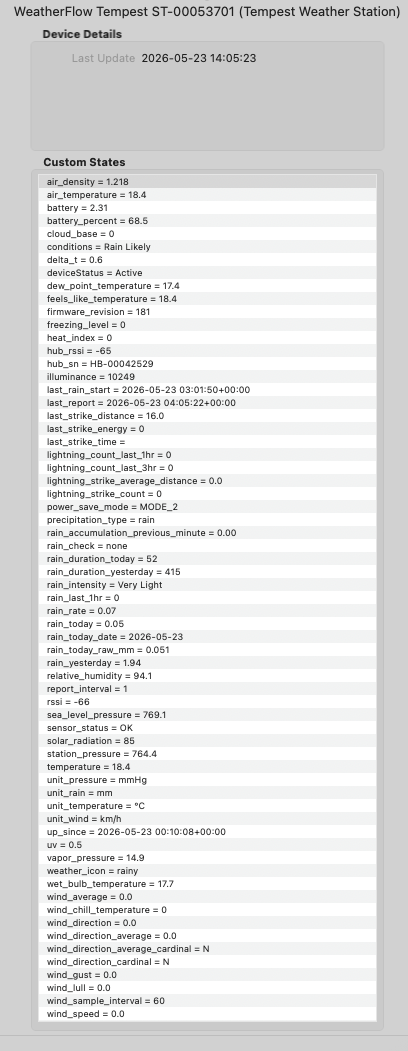
Indigo device states for a Tempest Weather Station showing live sensor readings, web-sourced rain totals, and unit labels.
Features
| Category | What you get |
|---|---|
| Temperature | Ambient, feels-like, dew point, wet bulb, wind chill, heat index, delta-T |
| Atmospheric | Station pressure, sea-level pressure, relative humidity, vapour pressure, air density |
| Wind | Instantaneous speed/direction (rapid-wind, ~3 s), 1-minute average, gust, lull, cardinal, sample interval |
| Rain | Per-minute accumulation, rain rate, intensity label, daily total, yesterday's total, Rain Check status |
| Rain (web) | Authoritative rain-check-corrected totals, last-1-hour rain, daily/yesterday rain duration in minutes |
| Lightning | Strike count, average distance, last-strike distance, energy and timestamp |
| Lightning (web) | Hourly and 3-hour strike counts |
| Conditions (web) | Weather conditions text and icon name from WeatherFlow forecast engine |
| Light | Illuminance (lux), solar radiation (W/m²), UV index |
| Battery | Voltage and percentage; power-save mode label; report interval |
| Derived | Cloud base, freezing level (both require altitude to be set) |
| Diagnostics | RSSI, firmware version, sensor fault flags, silence detection |
| Hub | Firmware, Wi-Fi RSSI, uptime, reset reasons |
| Public Stations | Monitor any public tempestwx.com station — full weather dataset plus distance and bearing from your Indigo server |
Navigation
| Page | Contents |
|---|---|
| Installation | Requirements and install steps |
| Plugin Configuration | UDP port, Web API token, log levels, device auto-generation |
| Web API | Web API setup, web-only mode, extra states |
| Tempest Device Configuration | Unit selection, altitude, device picker, web-only mode |
| Public Tempest Station | Monitor public stations, distance and direction states, building a weather network |
| Device States | Every state — what it means, units, notes |
| Triggers | Lightning, rain-start, and rapid-wind triggers |
| Rain Data | How daily rain is sourced and why power-save mode matters |
| Troubleshooting | Common problems and fixes |
| Architecture | Internal design: UDP → asyncio → Indigo |
Requirements
| Requirement | Version |
|---|---|
| Indigo | 2025.2 or later (ServerApiVersion 3.4) |
| WeatherFlow hub | Any — must be on the same subnet as the Indigo Mac (or use web-only mode) |
Quick Start
- Install the plugin (double-click
WeatherFlowTempest.indigoPlugin). - Go to Plugins → WeatherFlow Tempest → Configure → Generate Devices.
- Done — states populate within 60 seconds of the first UDP broadcast.
For web API features, see Plugin Configuration below.
See the Installation wiki page for full details.
Plugin Configuration
Open Plugins → WeatherFlow Tempest Weather Station → Configure.
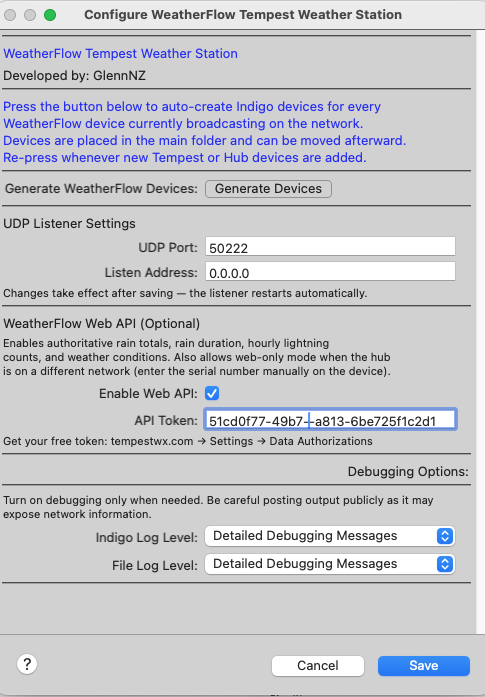
Device Generation
Click Generate Devices to auto-create Indigo devices for every Tempest and Hub currently broadcasting on the network. Re-press whenever new hardware is added.
UDP Listener Settings
| Setting | Description |
|---|---|
| UDP Port | Port the hub broadcasts on (default: 50222) |
| Listen Address | Network interface to listen on (default: 0.0.0.0 = all interfaces) |
Saving the preferences automatically restarts the UDP listener.
WeatherFlow Web API (Optional)
| Setting | Description |
|---|---|
| Enable Web API | Tick to activate web-based data polling |
| API Token | Your Personal Use Token from tempestwx.com → Settings → Data Authorizations |
When enabled the plugin polls the WeatherFlow REST API to supplement UDP data with:
- Authoritative rain totals — rain-check corrected daily and yesterday rain
- Rain last 1 hour — rolling 1-hour rainfall total
- Rain duration — minutes of measurable rain today and yesterday
- Conditions & icon — current weather description and icon name from WeatherFlow's forecast engine
- Hourly lightning counts — strikes in the last 1 hour and last 3 hours
The web API is polled every 5 minutes when UDP data is active (slow-changing supplemental data only), or every 60 seconds in web-only mode (all states come from web).
Getting a token: Log in to tempestwx.com, go to Settings → Data Authorizations, and generate a Personal Use Token. It is free and tied to your WeatherFlow account.
Note: The personal Web API authenticates by account — it only serves stations registered to the token's owner. To monitor other people's public stations, use the Public Tempest Station device type instead — no token required.
Debugging Options
| Setting | Description |
|---|---|
| Indigo Log Level | Verbosity of messages in the Indigo Event Log |
| File Log Level | Verbosity of messages written to the plugin log file |
Device Setup
Auto-create all devices at once (recommended)
- Open Plugins → WeatherFlow Tempest Weather Station → Configure.
- Click Generate Devices.
- The plugin creates one Indigo device for every Tempest and Hub currently broadcasting on the network. Devices are placed in the main Indigo device folder and can be moved afterward.
- Re-click the button whenever new hardware is added.
Manual device creation
- Go to Devices → New Device → Type: WeatherFlow Tempest Weather Station.
- Choose Tempest Weather Station or WeatherFlow Hub.
- Select your unit from the dropdown — devices are listed as soon as the hub broadcasts.
- Click Save.
Tip: If the device dropdown is empty, the hub has not yet sent a broadcast. Wait 30–60 seconds and use the Reload button in the dialog to refresh the list.
Tempest Device Configuration
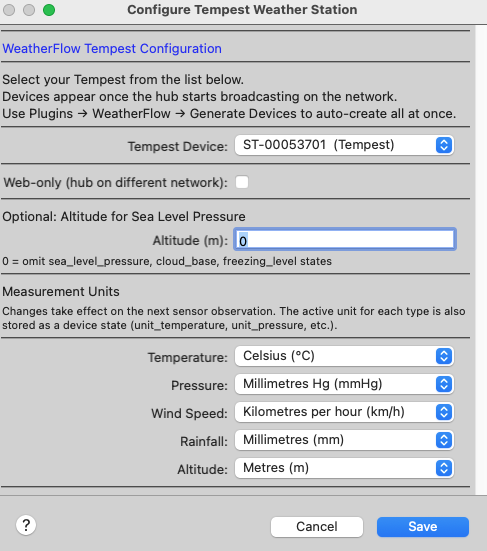
| Field | Description |
|---|---|
| Tempest Device | Serial number of the Tempest (ST-xxxxxxxx), discovered automatically from UDP |
| Web-only (hub on different network) | Tick to bypass UDP and use the web API exclusively — see below |
| Altitude (m) | Station elevation in metres above sea level. Used to calculate sea-level pressure, cloud base, and freezing level. Set to 0 to omit those derived states. |
| Temperature | °C or °F |
| Pressure | hPa (mbar), mmHg, or inHg |
| Wind Speed | m/s, km/h, mph, or knots |
| Rainfall | mm or inches |
| Altitude unit | Metres or feet (for cloud base and freezing level) |
Unit selections are independent — mix and match as needed. Changes take effect on the next sensor observation. Active unit labels are stored in the unit_temperature, unit_pressure, unit_wind, and unit_rain device states.
Web-only Mode
Enable Web-only (hub on different network) when the Tempest hub is on a separate network from the Indigo Mac (e.g. a remote property, a neighbour's setup with shared access, or a different VLAN where UDP broadcast doesn't reach).
When web-only is ticked, one additional field appears:
| Field | Description |
|---|---|
| Station ID | Numeric WeatherFlow station ID — found in the WeatherFlow app under station Settings |
The Web API must be enabled and a valid token entered in Plugin Preferences. The device is polled every 60 seconds and all sensor states (temperature, pressure, wind, rain, UV, lightning, conditions) are populated from the web. The deviceStatus state shows Active (web) when data is flowing.
Station ID: Open the WeatherFlow app, tap your station name, then tap Settings. The station ID is the number shown in the Station Information section.
Public Tempest Station
The Public Tempest Station device type lets you monitor any publicly-shared WeatherFlow station on tempestwx.com — no personal API token and no WeatherFlow account required.
Setup
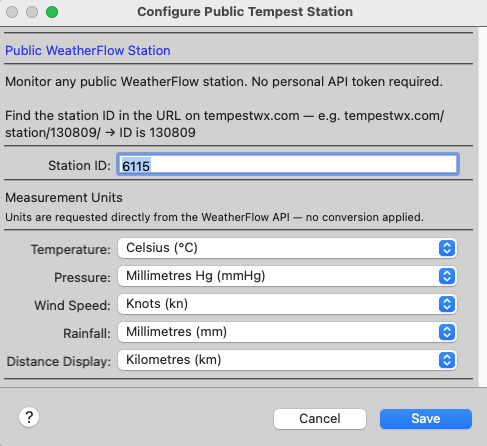
- Go to Devices → New Device → WeatherFlow Tempest Weather Station.
- Choose Public Tempest Station.
- Enter the station ID from its tempestwx.com URL (e.g.
tempestwx.com/station/130809/→130809). - Select your preferred units and click Save.
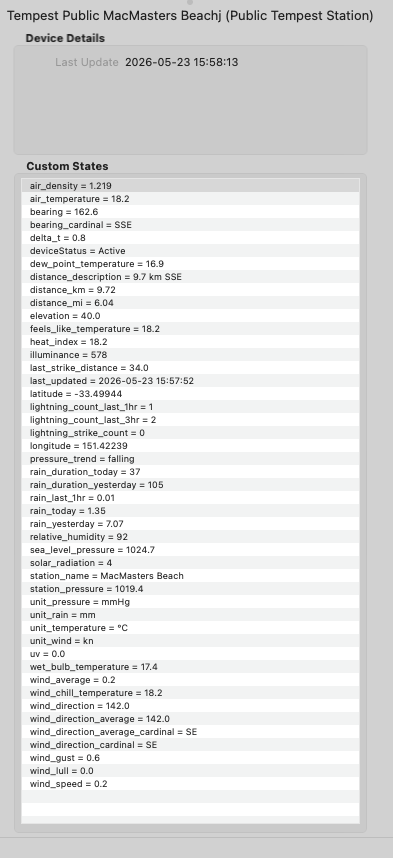
The device polls every 120 seconds and populates a full weather dataset including temperature, wind, rain, lightning, UV, and pressure — identical in breadth to a locally-connected Tempest.
Distance and Direction States
Each device automatically calculates the station's position relative to your Indigo server (requires latitude and longitude set in Indigo → Preferences → Location):
| State | Example | Description |
|---|---|---|
distance_km |
14.32 |
Distance in kilometres |
distance_mi |
8.90 |
Distance in miles |
bearing |
22.5 |
Bearing from Indigo to station in degrees (0 = North, clockwise) |
bearing_cardinal |
NNE |
16-point compass — N, NNE, NE, ENE, E, ESE, SE, SSE, S, SSW, SW, WSW, W, WNW, NW, NNW |
distance_description |
14.3 km NNE |
Human-readable combined label; auto-scales to metres / feet at short range |
The bearing is measured from your Indigo server toward the station — NNE means the station lies to your north-north-east. The distance_description state can be placed directly in Control Pages or notification messages.
Building a Weather Network
You can add as many Public Tempest Station devices as you like — there is no limit. Each polls independently on its own 120-second cycle. Common uses:
- Monitor upwind stations to anticipate incoming rain or wind changes before they reach your location
- Compare microclimates — coastal vs. inland, valley vs. ridge, urban vs. rural
- Track lightning at distance using the
lightning_count_last_1hrandlightning_count_last_3hrstates across multiple stations to gauge storm approach direction - Rich Control Pages — display a ring of surrounding stations each labelled by their
distance_description
See the Public Tempest Station wiki page for the full state reference, failure handling, and detailed examples.
Device States
Tempest Weather Station
Temperature
| State | Description |
|---|---|
air_temperature |
Ambient temperature |
temperature |
Alias for air_temperature |
feels_like_temperature |
Apparent / feels-like temperature |
dew_point_temperature |
Dew point |
wet_bulb_temperature |
Wet bulb temperature |
wind_chill_temperature |
Wind chill |
heat_index |
Heat index |
delta_t |
Delta-T (dry bulb minus wet bulb) |
Atmospheric
| State | Description |
|---|---|
relative_humidity |
Relative humidity (%) |
station_pressure |
Raw station pressure |
sea_level_pressure |
Sea-level corrected pressure (requires altitude > 0) |
vapor_pressure |
Vapour pressure |
air_density |
Air density (kg/m³, always metric) |
Derived (require altitude > 0)
| State | Description |
|---|---|
cloud_base |
Estimated cloud base height above station |
freezing_level |
Estimated freezing level height above station |
Light & UV
| State | Description |
|---|---|
illuminance |
Illuminance (lux) |
solar_radiation |
Solar irradiance (W/m²) |
uv |
UV index |
Rain
| State | Source | Description |
|---|---|---|
rain_accumulation_previous_minute |
UDP | Rain accumulated in the previous minute |
rain_rate |
UDP | Current rain rate (mm/h or in/h) |
rain_intensity |
UDP | None / Very Light / Light / Moderate / Heavy / Violent |
rain_today |
UDP + Web | Total rain since local midnight (web value is rain-check corrected) |
rain_yesterday |
UDP + Web | Yesterday's total rain |
rain_check |
UDP | WeatherFlow Rain Check verification status (none / on / off) |
precipitation_type |
UDP | none, rain, hail, or rain_hail |
last_rain_start |
UDP | Timestamp of the most recent rain-start event (UTC) |
rain_last_1hr |
Web only | Rain accumulated in the last 60 minutes |
rain_duration_today |
Web only | Minutes of measurable rain today |
rain_duration_yesterday |
Web only | Minutes of measurable rain yesterday |
Lightning
| State | Source | Description |
|---|---|---|
lightning_strike_count |
UDP | Strikes detected in the last 3 minutes |
lightning_strike_average_distance |
UDP | Average distance of recent strikes |
last_strike_distance |
UDP | Distance of the most recent strike |
last_strike_energy |
UDP | Energy of the most recent strike |
last_strike_time |
UDP | Timestamp of the most recent strike (UTC) |
lightning_count_last_1hr |
Web only | Strikes in the last 60 minutes |
lightning_count_last_3hr |
Web only | Strikes in the last 3 hours |
Conditions (Web API only)
| State | Description |
|---|---|
conditions |
Current weather description (e.g. "Partly Cloudy") |
weather_icon |
Icon name from WeatherFlow's forecast engine (e.g. partly-cloudy-day) |
Wind
| State | Description |
|---|---|
wind_speed |
Instantaneous wind speed (rapid-wind, ~3 s interval) |
wind_average |
1-minute average wind speed |
wind_gust |
1-minute wind gust |
wind_lull |
1-minute wind lull |
wind_direction |
Instantaneous wind direction (°) |
wind_direction_average |
1-minute average wind direction (°) |
wind_direction_cardinal |
Instantaneous cardinal direction (N, NE, …) |
wind_direction_average_cardinal |
Average cardinal direction |
wind_sample_interval |
Wind measurement window (seconds) |
Unit labels
| State | Description |
|---|---|
unit_temperature |
Active temperature unit label (e.g. °C) |
unit_pressure |
Active pressure unit label (e.g. hPa) |
unit_wind |
Active wind speed unit label (e.g. km/h) |
unit_rain |
Active rain unit label (e.g. mm) |
Battery & power
| State | Description |
|---|---|
battery |
Battery voltage (V) |
battery_percent |
Battery level (%) |
power_save_mode |
Active power-save mode name |
report_interval |
Observation reporting frequency (minutes) |
Diagnostics
| State | Description |
|---|---|
rssi |
Tempest RF signal strength (dBm) |
hub_rssi |
Hub RF signal strength (dBm) |
firmware_revision |
Tempest firmware version |
hub_sn |
Hub serial number |
up_since |
Device power-on timestamp (UTC) |
last_report |
Timestamp of the most recent observation (UTC) |
sensor_status |
Sensor fault flags, or OK |
deviceStatus |
Active (UDP), Active (web) (web-only), Waiting for data on startup, No data — last seen N min ago if silent |
WeatherFlow Hub
| State | Description |
|---|---|
firmware_revision |
Hub firmware version |
rssi |
Hub Wi-Fi signal strength (dBm) |
up_since |
Hub power-on timestamp (UTC) |
uptime |
Seconds since last boot |
reset_flags |
Reason(s) for the last reset (comma-separated) |
deviceStatus |
Connection status |
Public Tempest Station
Distance and Direction
| State | Description |
|---|---|
distance_km |
Distance from Indigo server to station (km) |
distance_mi |
Distance from Indigo server to station (miles) |
bearing |
Bearing from Indigo to station (degrees, 0 = North) |
bearing_cardinal |
Cardinal abbreviation: N, NNE, NE, ENE … NNW |
distance_description |
Human-readable combined label, e.g. 14.3 km NNE |
Station Identity
| State | Description |
|---|---|
station_name |
Station display name |
latitude |
Station latitude |
longitude |
Station longitude |
elevation |
Station elevation (metres) |
Weather States
All temperature, atmospheric, light, wind, rain, and lightning states mirror the Tempest Weather Station state set above. Rain totals are rain-check corrected. Full details on the Public Tempest Station wiki page.
Triggers
Three custom trigger types are available under Triggers → New Trigger → WeatherFlow Tempest Weather Station.
Each trigger includes a Tempest Device picker so it can be scoped to a specific station when you have more than one.
Lightning Strike Detected
Fires whenever the selected Tempest detects a lightning strike.
| Field | Description |
|---|---|
| Tempest Device | The Tempest station to watch. Leave blank to fire for any station. |
The last_strike_distance, last_strike_energy, and last_strike_time device states are updated before the trigger fires.
Use cases: push notification with distance and energy; flash a light; log strikes to a variable.
Rain Started
Fires when the Tempest detects the onset of precipitation (the first rain-start event after a dry period).
Note: This trigger fires from the Tempest's dedicated rain-start event, which is sent immediately when the sensor detects rain — independent of the 1-minute observation cycle. It fires once per rain onset, not repeatedly while rain continues.
The last_rain_start device state is updated when this trigger fires.
Use cases: close roof vents; retract a pergola awning; send a notification.
Rapid Wind Exceeds Threshold
Fires when an instantaneous wind reading meets or exceeds a configurable speed. Rapid-wind readings arrive approximately every 3 seconds.
| Field | Description |
|---|---|
| Tempest Device | The Tempest station to watch. |
| Threshold (m/s) | Minimum wind speed (in m/s) required to fire the trigger. |
The threshold is always compared against the raw m/s magnitude regardless of the display unit. Convert if needed: 1 m/s = 3.6 km/h = 2.237 mph = 1.944 kn.
Use cases: close greenhouse vents above 10 m/s; retract a sail shade above 15 m/s.
Trigger Limitations
- In power-save MODE_2 and above, rapid-wind events are not sent by the Tempest. The Rapid Wind Exceeds Threshold trigger will not fire in those modes.
- Lightning and rain-start triggers fire from discrete UDP events and are not affected by power-save mode.
Station Silence Detection
The plugin monitors each Tempest station for data dropouts. If no observation is received for more than 5 minutes:
- The
deviceStatusstate is updated to"No data — last seen N min ago". - A warning is written to the Indigo Event Log.
- The warning repeats every 30 minutes with an updated elapsed time.
When data resumes, deviceStatus returns to "Active" automatically and a recovery notice is logged.
The plugin also monitors the UDP listener itself — if the background socket task crashes, the listener is restarted automatically within 60 seconds. The web API poller is similarly monitored and restarted if it exits unexpectedly.
Plugin Menu
Plugins → WeatherFlow Tempest Weather Station exposes two menu commands:
- List Discovered WeatherFlow Devices — logs all currently-discovered serial numbers, models, and firmware versions to the Event Log.
- Restart UDP Listener — stops and restarts the listener without reloading the plugin (useful after network changes).
Troubleshooting
Device dropdown is empty / "No devices discovered yet" - Confirm the WeatherFlow hub is on the same subnet as the Indigo Mac. UDP broadcast does not cross router boundaries. - Check that nothing is blocking UDP port 50222 (macOS firewall, managed switch, VLAN separation). - Wait 60 seconds — hubs broadcast a status packet roughly once per minute — then use the Reload button in the device dialog. - If the hub is on a different network, use Web-only mode in the device configuration instead.
deviceStatus shows "No data — last seen N min ago"
- The station has not sent an observation in over 5 minutes. Check the hub's power and Wi-Fi connection, and confirm the Tempest is within RF range.
- Use Plugins → WeatherFlow → Restart UDP Listener to retry without reloading the plugin.
Web API returns 401 Unauthorized - Verify the API token is correct in Plugin Preferences (Plugins → Configure). - Ensure the Station ID in the device config matches a station registered to the token's account. Find your station ID in the WeatherFlow app under station Settings. - After 3 consecutive 401 errors for a station, polling is suspended. Correct the station ID and save the device to resume.
rain_last_1hr, conditions, weather_icon are always empty
- These states require the Web API to be enabled. Tick Enable Web API in Plugin Preferences and enter a valid token.
sea_level_pressure, cloud_base, freezing_level are missing
- Set Altitude (m) to a non-zero value in the Tempest device configuration.
sensor_status shows all sensors failed
- This is a known firmware quirk (seen in firmware 181) where the hardware register is read before sensor self-test completes. The plugin detects this pattern and displays OK instead. A subset of sensors listed as failed is a genuine fault.
Debug logging
- Set Indigo Log Level to Debugging Messages in Plugin Preferences for verbose output.
- The plugin log file is at ~/Library/Application Support/Perceptive Automation/Indigo 2025.x/Logs/. Set File Log Level to Detailed Debugging Messages for maximum detail.
Libraries & Acknowledgements
pyweatherflowudp — v1.5.2
by Nathan Spencer (@natekspencer)
The core UDP library that handles all communication with the WeatherFlow hub. Provides an event-based async interface, parses every WeatherFlow message type, and exposes sensor values as typed properties with full unit support. All derived meteorological calculations (dew point, wet bulb, heat index, feels-like, vapour pressure, air density, sea-level pressure, cloud base, freezing level) are provided by this library.
Licensed under MIT. Consider supporting Nathan on Ko-fi.
Pint — v0.25.3
Physical quantity handling with units. All sensor values carry their native unit and are converted to the user's chosen display unit using Pint's unit registry.
PsychroLib — v2.5.0
Psychrometric calculations used by pyweatherflowudp to derive wet bulb temperature and related humidity metrics.
License
MIT — see LICENSE for details.
Developed by GlennNZ.
| v2.5.8 | Requires Indigo v2023.2.0+ | Released June 18, 2026 | Fix Public Tempest Station ignoring unit preferences (always showed metric); fix `last_strike_distan |
| Released on: | June 18, 2026 |
| Requires: | Indigo v2023.2.0+ |
| Downloaded: | 7 times |
| Download this release | |
Release 2.5.8
Released: 2026-06-08 Minimum Indigo version: 2025.2
Highlights
Fixes three separate bugs that caused last_strike_distance and last_strike_time to remain empty or stale during active thunderstorms.
Fixes Public Tempest Station unit conversion — temperature, wind, pressure, and rain states were always displayed in metric regardless of device configuration.
Also adds a Distance Display unit preference (km / mi) to Tempest, Sky, and Air device configuration.
NB: Lightning states are very confusing (at least to me) Check the Wiki for information
Bug Fixes
1. last_strike_distance gated behind include_standard (web API path)
Root cause: The web API field lightning_strike_last_distance was only read inside the include_standard block. That block only runs when UDP observations are inactive (stale / web-only mode). With a working UDP device, evt_strike UDP packets are supposed to keep last_strike_distance current — but evt_strike is a separate UDP event that can be silently lost even when normal obs_st observations are flowing normally. When that happens, the state never updates from either path and stays permanently empty.
Fix: Moved last_strike_distance to the always-runs section of _build_web_observation_states, identical to where lightning_count_last_1hr / lightning_count_last_3hr already sit. It now refreshes on every web poll regardless of whether UDP is active.
2. last_strike_time had no web source at all
Root cause: The WeatherFlow REST API provides lightning_strike_last_epoch — a Unix timestamp of the most recent strike — in every observation response. The plugin never read this field. last_strike_time could only ever be populated by UDP evt_strike packets. If those don't arrive (see bug 1), the state stays permanently empty with no fallback.
Fix: Added lightning_strike_last_epoch → last_strike_time extraction in the always-runs section, converting the Unix epoch to a UTC datetime string.
3. UDP strike events logged at DEBUG only (observability gap)
Root cause: The _on_strike handler emitted its summary at DEBUG level. In normal (non-debug) operation, there was no log evidence that evt_strike UDP packets were arriving at all, making it impossible to distinguish "strikes are happening but states aren't updating" from "no strike packets are arriving."
Fix: Promoted to INFO — every UDP strike now logs distance=X energy=Y at INFO level.
Bug Fix
4. Public Tempest Station ignored unit preferences (always showed metric)
Root cause: _build_public_obs_states assumed the observations/station/{id} API would honour unit query parameters (units_temp=f, units_wind=mph, etc.) and return values already in the user's preferred units. In practice the endpoint returns metric values regardless of what unit parameters are sent — meaning a Public Station configured for Fahrenheit, mph, and inches still displayed °C, m/s, and mm.
Fix: Aligned the Public Tempest Station path with how personal stations have always worked:
| Before | After | |
|---|---|---|
| API fetch | Dynamic unit params sent, API expected to convert | Always requests metric (units_temp=c, units_wind=mps, units_pressure=mb, units_precip=mm, units_distance=km) |
| Conversion | Assumed done by API; values written as-is | Plugin converts via _add_u / Pint — identical to _build_web_observation_states |
last_strike_distance |
Hardcoded km symbol |
_add_u with "distance" category — converts to km or mi per device setting |
Affected states (now correctly converted):
| State | API field | Metric unit in | Converts to |
|---|---|---|---|
air_temperature |
air_temperature |
°C | °C or °F |
dew_point_temperature |
dew_point |
°C | °C or °F |
wet_bulb_temperature |
wet_bulb_temperature |
°C | °C or °F |
feels_like_temperature |
feels_like |
°C | °C or °F |
heat_index |
heat_index |
°C | °C or °F |
wind_chill_temperature |
wind_chill |
°C | °C or °F |
delta_t |
delta_t |
Δ°C | Δ°C or Δ°F |
station_pressure |
station_pressure |
hPa | hPa, mmHg, or inHg |
sea_level_pressure |
sea_level_pressure |
hPa | hPa, mmHg, or inHg |
wind_average / wind_speed |
wind_avg |
m/s | m/s, km/h, kn, or mph |
wind_gust |
wind_gust |
m/s | m/s, km/h, kn, or mph |
wind_lull |
wind_lull |
m/s | m/s, km/h, kn, or mph |
rain_today |
precip_accum_local_day |
mm | mm or in |
rain_yesterday |
precip_accum_local_yesterday |
mm | mm or in |
rain_last_1hr |
precip_accum_last_1hr |
mm | mm or in |
last_strike_distance |
lightning_strike_last_distance |
km | km or mi |
Fixed-unit states (UV, solar radiation, illuminance, relative humidity, elevation, air density) are unchanged.
Existing devices: No configuration changes required. Values will now display in whatever units are set in Edit Device — if you've had the device configured for Fahrenheit/mph/inches all along, they will now correctly show those units after the plugin reloads.
New Feature
Distance Display unit preference for Tempest, Sky, and Air devices
Problem: last_strike_distance and lightning_strike_average_distance were always displayed in kilometres, regardless of how the device was otherwise configured. The Public Tempest Station device type already had a Distance Display preference; Tempest, Sky, and Air did not.
Fix:
- Added a Distance Display field (Kilometres / Miles) to the ConfigUI of Tempest, Sky, and Air device types.
_get_unit_prefs()now readsdistUnitfrom the device's saved properties (defaulting to"km"for existing devices).- Lightning distance states are converted to the selected unit before being written to Indigo.
- The per-strike INFO log line shows the distance in the selected unit.
Existing devices default to km — no action required unless you want miles.
Lightning State Reference
The WeatherFlow lightning sensor uses radio frequency detection to identify return strokes. Its data reaches the plugin through three separate pathways that update at different times and answer different questions — mixing them up is the source of most lightning-related confusion.
Per-observation states (updated every ~1 minute with each obs_st packet)
| State | Typical value | What it means |
|---|---|---|
lightning_strike_count |
0 most of the time; 1–5+ during active storms | Number of strikes detected within the current 1-minute observation window. Resets to 0 at the start of every new observation. This is a window count, not a running total. |
lightning_strike_average_distance |
0 when no strikes; 1–40 during storms | Average distance (in your chosen unit) of all strikes within that same 1-minute window. Only meaningful when lightning_strike_count > 0. Reads 0 whenever the count is zero — not the same as a strike at 0 km. |
lightning_strike_count = 0between strike-active minutes is completely normal. The sensor reports a fresh window count every minute; if no strike was detected in that minute, the count is 0. For "is there a storm right now?", uselightning_count_last_1hr(requires Web API token).
Per-strike states (updated when a strike is detected)
These states are written by two sources that now both feed the same states:
- UDP path —
evt_strikepackets arrive separately from observations and can occasionally be lost even whenobs_stpackets are flowing normally. - Web API path (new in v2.5.8, requires API token) —
lightning_strike_last_distanceandlightning_strike_last_epochare present in every observation response and now always update these states as a fallback.
| State | Source | Typical value | What it means |
|---|---|---|---|
last_strike_distance |
UDP + Web† | Blank until first strike, then persists | Distance of the single most recent strike. Stays set after the storm ends — always read alongside last_strike_time to judge how recent it is. Blank if the sensor could not determine range (minimum reliable detection ~1 km; very close strikes may report null). |
last_strike_energy |
UDP only | Blank until first strike, then persists | A dimensionless relative intensity value from the sensor hardware. Not joules or watts — it's an internal metric roughly proportional to return-stroke intensity. Useful for comparing strikes within a storm; meaningless as an absolute number. Blank when the sensor reported null. |
last_strike_time |
UDP + Web† | Blank until first strike, then persists | UTC timestamp of the most recent detected strike. Persists until the next strike — use this to determine whether last_strike_distance is from a current storm or a storm days ago. |
† Web API fallback requires a valid API token in Plugin Preferences. Without a token, these states are only populated by UDP
evt_strikepackets.
Rolling window counts (updated every ~60 s from the Web API)
Requires a valid API token. These are quality-controlled by the WeatherFlow cloud.
| State | Typical value | What it means |
|---|---|---|
lightning_count_last_1hr |
0 most of the time; accumulates during storms | Count of all strikes in the rolling last 60 minutes. The most reliable indicator of current storm activity. Use this in triggers: "if lightning_count_last_1hr > 0". |
lightning_count_last_3hr |
0 most of the time; higher during extended activity | 3-hour rolling window. Useful for tracking an approaching or receding storm system. |
Quick reference: which state to use for what
| Question | State to use |
|---|---|
| Is there lightning happening right now? | lightning_count_last_1hr > 0 |
| How far away was the most recent strike? | last_strike_distance (with last_strike_time to confirm it's current) |
| How many strikes were in the last minute? | lightning_strike_count |
| How close is the storm on average? | lightning_strike_average_distance (when lightning_strike_count > 0) |
| How intense was the last strike? | last_strike_energy (relative comparison only) |
| Is the storm getting closer or moving away? | Compare lightning_count_last_1hr vs lightning_count_last_3hr |
Upgrade Notes
- No configuration changes required for any device type.
- Public Tempest Station: Values will now display in the units configured in Edit Device. If you have had the device set to Fahrenheit/mph/inches and it was showing metric, it will immediately show correct values after the plugin reloads — no reconfiguration needed.
- Lightning states (
last_strike_distance,last_strike_time) now populate from the web API even when UDP strike events are not arriving — requires an API token. - Distance Display for Tempest/Sky/Air: Existing devices default to km. To switch to miles, Edit Device → Distance Display → Miles (mi).
| Released on: | June 4, 2026 |
| Requires: | Indigo v2023.2.0+ |
| Downloaded: | 4 times |
| Download this release | |
Release 2.5.7
Released: 2026-06-04 Minimum Indigo version: 2025.2
Highlights
Completes the unit-label cleanup started in 2.5.6. The Conditions menu (used when adding conditions to Triggers and Schedules) no longer shows hardcoded metric unit annotations alongside state names.
Changes
Conditions menu — remove hardcoded unit annotations from ControlPageLabel
Background: Indigo uses two separate label fields in Devices.xml:
| Field | Used by |
|---|---|
TriggerLabel |
Triggers tab — state picker when creating a trigger based on a device state change |
ControlPageLabel |
Conditions tab — state picker when adding an "if device" condition to a Trigger or Schedule |
Release 2.5.6 removed hardcoded metric units from TriggerLabel but did not touch ControlPageLabel. As a result, the Conditions tab still showed entries like "Air Temp °C", "Wind Speed m/s", "Pressure mbar" regardless of the device's unit setting.
Fix: Removed the hardcoded unit suffix from all variable-unit ControlPageLabel entries across the Tempest, Sky, Air, and Public Station device blocks.
Examples:
| Before | After |
|---|---|
Air Temp °C |
Air Temp |
Wind Speed m/s |
Wind Speed |
Pressure mbar |
Pressure |
SLP mbar |
Sea Level Pressure |
Vapor Press mbar |
Vapor Pressure |
Rain Accum mm |
Rain Accum |
Rain Rate mm/h |
Rain Rate |
Lightning Dist km |
Lightning Dist |
Last Strike km |
Last Strike Dist |
Wind Avg m/s |
Wind Avg |
Wind Gust m/s |
Wind Gust |
Wind Lull m/s |
Wind Lull |
Heat Index °C |
Heat Index |
Delta T °C |
Delta T |
Fixed-unit labels (%, W/m², lx, UV, V, dBm, °) are unchanged. Existing conditions and triggers continue to work without modification.
Upgrade Notes
- No configuration changes required.
- Label changes take effect after plugin reload.
- Existing triggers and conditions are unaffected — only the display text in the state picker menus changes.
| v2.5.6 | Requires Indigo v2023.2.0+ | Released June 3, 2026 | Heat index and wind chill show blank (not 0) when conditions are not met; trigger/condition menus no |
| Released on: | June 3, 2026 |
| Requires: | Indigo v2023.2.0+ |
| Downloaded: | 4 times |
| Download this release | |
Release 2.5.6
Released: 2026-06-03 Minimum Indigo version: 2025.2
Highlights
heat_index and wind_chill_temperature now show blank when conditions are not met. Trigger/condition menus no longer show hardcoded °C, mbar, m/s, or mm unit labels.
Changes
Heat Index and Wind Chill — blank (None) when conditions are not met
pyweatherflowudp returns None for these states when conditions are outside the calculation range:
| State | Returns None when |
|---|---|
heat_index |
temperature < 80 °F or relative humidity < 40 % |
wind_chill_temperature |
temperature > 50 °F or wind speed < 3 mph |
Previously, when the value was None the plugin skipped writing the state entirely — leaving whatever value was last recorded. This meant a stale reading persisted indefinitely, and a unit preference change (e.g. Celsius → Fahrenheit) would never be reflected until conditions happened to come back into range.
The plugin now always writes the state when None is received, storing None as the value with a blank display string:
| Situation | value |
Display |
|---|---|---|
| Conditions met — valid reading | 95.3 |
95.3 °F |
Conditions not met — None returned |
None |
(blank) |
The None write is immediate — no stale value lingers after a weather change or unit preference update. Because these states are not typically used in numeric triggers, the None value is appropriate; the blank display clearly communicates "not applicable" rather than a misleading 0.
Trigger/condition menus — remove hardcoded unit annotations
The Indigo trigger and condition UI shows the state's TriggerLabel from Devices.xml in the state picker dropdown. These labels were annotated with hardcoded metric units — (°C), (mbar), (m/s), (mm) — regardless of the device's actual unit setting. A device set to Fahrenheit would show "Air Temperature (°C)" in the trigger dropdown, creating confusion about what unit to enter for the comparison threshold.
The unit suffix has been removed from all variable-unit TriggerLabel entries across the Tempest, Sky, Air, and Public Station device blocks. Fixed-unit labels (%, W/m², lx, UV, V, dBm, °) are unchanged.
Examples:
| Before | After |
|---|---|
Air Temperature (°C) |
Air Temperature |
Wind Speed (m/s) |
Wind Speed |
Station Pressure (mbar) |
Station Pressure |
Rain Rate (mm/h) |
Rain Rate |
Heat Index (°C) |
Heat Index |
Delta T (°C) |
Delta T |
The active unit is always visible in the state's current uiValue (e.g. 32.8 °F) and is also stored in the unit_temperature, unit_pressure, unit_wind, and unit_rain states.
Upgrade Notes
- No configuration changes required.
TriggerLabelchanges take effect after plugin reload — existing triggers continue to work unchanged.- On the next observation after reload,
heat_indexandwind_chill_temperaturewill show blank if conditions are not currently met, clearing any stale reading.
| v2.5.5 | Requires Indigo v2023.2.0+ | Released May 31, 2026 | 2.5.5 Fix `delta_t` and `heat_index` ignoring temperature unit preference — both now correctly displ |
| Released on: | May 31, 2026 |
| Requires: | Indigo v2023.2.0+ |
| Downloaded: | 22 times |
| Download this release | |
2.5.4 and 2.5.5 Changes below (and see wiki)
Release 2.5.4
Released: 2026-05-30 Minimum Indigo version: 2025.2
Highlights
Rain accumulation is now cleanly separated into two independent tracks. The web API provides rain-check corrected daily totals in rain_today / rain_yesterday. The device provides raw local totals in rain_today_local / rain_yesterday_local. Neither track can corrupt the other.
Changes
Separate Local and Web Rain Accumulation
Background: Two independent paths were writing to the same rain_today state:
- UDP path — reads the hub's own daily rain counter (hub index 18, resets at local midnight). Falls back to accumulating per-minute rain values when the hub sends shorter packets in power-save / low-battery mode (e.g. when
Precipitation Failedappears in sensor_status). - Web API path — reads
precip_accum_local_dayfrom WeatherFlow, which is always rain-check corrected and typically the more accurate total.
With both paths writing rain_today, the state alternated every ~60 seconds between the raw local value and the web value. In power-save mode this was especially visible: local showed "accumulated" while web showed a slightly different corrected total.
Additionally, the fallback accumulation used rain_today_raw_mm as its running baseline — the same state the web API wrote to. Each web poll would shift the baseline, causing the next per-minute delta to be added on top of a different starting point.
Fix — fully separated write ownership:
| State | Written by | Contains |
|---|---|---|
rain_today |
Web API only | Rain-check corrected daily total |
rain_today_raw_mm |
Web API only | Same, in raw mm |
rain_yesterday |
Web API only | Rain-check corrected yesterday total |
rain_today_local |
UDP only | Device daily total (not rain-check corrected) |
rain_today_local_raw_mm |
UDP only | Same, in raw mm — accumulation baseline |
rain_yesterday_local |
UDP only | Device yesterday total (captured at midnight) |
rain_today_source |
UDP only | "hub" or "accumulated" |
rain_today_source values:
| Value | Meaning |
|---|---|
hub |
Hub index 18 present — device's own authoritative daily counter |
accumulated |
Hub index 18 absent (power-save / sensor fault) — plugin accumulating per-minute values as fallback |
Web API is the primary source for most users. rain_today shows the rain-check corrected total and is the recommended state for automations. rain_today_local is available when you want the raw device value or need a value independent of web availability.
Midnight rollover: at midnight the plugin captures rain_today_local_raw_mm into rain_yesterday_local. The web API writes rain_yesterday from precip_accum_local_yesterday. Both yesterday states update independently.
Upgrade Notes
- No configuration changes required.
- The four new states are added automatically on the first observation after the plugin is reloaded.
rain_todayandrain_yesterdaynow update only when the web API polls (~60 s). They no longer update every UDP observation. Existing automations using these states are unaffected — values are the same, just sourced exclusively from web.- If you were using
rain_todayas a real-time per-minute counter, switch torain_today_localfor that use case.
&&&&
Release 2.5.5
Released: 2026-05-31 Minimum Indigo version: 2025.2
Highlights
delta_t and heat_index now correctly honour the device temperature unit preference. Previously both states always displayed in Celsius regardless of whether the device was set to Fahrenheit.
Changes
Fix delta_t temperature unit conversion
Problem: delta_t (the difference between air temperature and wet-bulb temperature) was listed in _FIXED_SPECS with a hardcoded Δ°C label, so it never converted to Δ°F even when the device's temperature unit was set to Fahrenheit.
Fix: Moved delta_t out of _FIXED_SPECS and into the standard unit conversion pipeline:
| Temperature preference | Value | Display |
|---|---|---|
| Celsius | Raw Δ°C from pyweatherflowudp | 2.1 Δ°C |
| Fahrenheit | Δ°C × 1.8 (differential — no +32 offset) | 3.8 Δ°F |
The public station path also hardcoded Δ°C; that is corrected to match the device's temperature unit preference.
Why ×1.8 and not a Pint .to("degF") call?
delta_t is a temperature differential, not an absolute temperature. Converting Δ1 °C → Δ°F requires multiplying by 1.8. Using Pint's .to("degF") on a degC quantity would add the 32 °F offset, producing a wrong result. The manual factor of 1.8 avoids this.
Fix heat_index stale Celsius when conditions are not met
Problem: pyweatherflowudp returns None for heat_index when the temperature is below 80 °F or relative humidity is below 40 %. When that happens the plugin skips writing the state entirely, leaving whatever value was last written. If the user had previously been in Celsius mode and then switched to Fahrenheit while conditions were below the heat index threshold, the state would show the stale Celsius reading indefinitely.
Fix: When device.heat_index is None, the plugin now explicitly writes 0 with the correct unit symbol for the current temperature preference. This clears any stale reading.
| Condition | State written |
|---|---|
device.heat_index is a valid value |
Converted to °C or °F per preference |
device.heat_index is None (below threshold) |
0 °C or 0 °F — stale value cleared |
Upgrade Notes
- No configuration changes required.
- On the first observation after plugin reload,
delta_tandheat_indexwill update with correctly converted values. - If
delta_thad previously been showing Δ°C and you are set to Fahrenheit, it will now show Δ°F from the next UDP observation. heat_indexwill show0 °F(or0 °C) when conditions are not met, rather than the previous valid reading.
| v2.5.3 | Requires Indigo v2023.2.0+ | Released May 26, 2026 | 2.5.3 Offline detection rewritten — the 2.5.1 implementation used a better_forecast field that prove |
| Released on: | May 26, 2026 |
| Requires: | Indigo v2023.2.0+ |
| Downloaded: | 20 times |
| Download this release | |
Release 2.5.3
Released: 2026-05-26 Minimum Indigo version: 2025.2
Highlights
Two improvements to how the plugin handles an offline personal Tempest station:
- Offline detection rewritten — the 2.5.1 implementation used a
better_forecastfield that proved unreliable; a correct documented API endpoint is now used instead. - Device error state — when a station goes stale or offline, the Indigo device turns red in the UI with a status string. Clears automatically when the station recovers.
Changes
Personal Station Offline Detection Rewritten
Problem (2.5.1 regression): The 2.5.1 fix for stale web data worked correctly for Public Tempest Station devices but not for personal stations. The personal web poller used better_forecast.current_conditions.time as the observation timestamp — a field that always reflects the time WeatherFlow generated the API response (2–3 seconds ago), not when the Tempest device last transmitted. Additionally, better_forecast.station.is_station_online returns True even when the device has a completely flat battery.
The result: the 10-minute age gate in 2.5.1 never fired for personal stations, and stale cached data continued to be written to Indigo states when a station was offline.
Investigation: A complete audit of available WeatherFlow REST API endpoints was performed against a live flat-battery device:
| Endpoint / Field | Value when offline | Reliable? |
|---|---|---|
better_forecast → current_conditions.time |
Always 2–3 s | ❌ API generation time |
better_forecast → station.is_station_online |
True |
❌ Always true |
better_forecast → station.state |
1 |
❌ Static config value |
/stations/{id} → device fields |
No status fields | ❌ Config metadata only |
/diagnostics/{id} |
Accurate | ❌ Requires partner API key |
/observations/stn/{id} → obs |
[] (empty list) |
✅ Definitive offline signal |
Fix: Every web poll cycle now makes two API calls:
better_forecast— unchanged, provides current conditions data for device states./observations/stn/{station_id}?api_key={token}&bucket=1— the documented personal station observations endpoint.bucket=1returns the latest 1-minute record only. When the station is offline,obs: []is returned.
Offline detection logic:
obs: []→ station has no recent observations — update is rejected.obs[-1][0]→ timestamp of the most recent observation record. If more than 10 minutes old, update is also rejected (secondary age gate).- Normal operation — observation age is logged at Debug level:
station 183063: /observations/stn status={'status_code': 0, 'status_message': 'SUCCESS'}  obs count=1
  My Tempest: web observation age 47 s (0.8 min)
Note on endpoint naming: /observations/stn is the documented personal station endpoint in the WeatherFlow API reference. /observations/station (used for public stations) also returns obs: [] when offline, but is the public-facing endpoint. Using the correct personal endpoint avoids any reliance on undocumented behaviour.
Device Error State When Station is Offline
When a personal station's data is stale or absent, the plugin now marks the Indigo device with an error state so it is immediately visible in the Indigo client UI (device row turns red, status column shows the error string).
Two thresholds:
| Stale duration | deviceStatus state |
Indigo error state |
|---|---|---|
| < 10 minutes | unchanged | none |
| 10 – 30 minutes | Stale data |
Stale data (device turns red) |
| > 30 minutes | Offline |
Offline (device turns red) |
Recovery is automatic — on the next successful poll after the station comes back online, the error state is cleared and all device states resume updating normally. No manual action required.
Cleared at startup — if the plugin is reloaded or Indigo restarts while a station is offline, any lingering error state from the previous session is cleared immediately on deviceStartComm and set fresh once the first poll completes.
Log output during an offline event:
Warning: My Tempest: station offline — no recent observations (stale 0 min)
Warning: My Tempest: station offline — no recent observations (stale 12 min)   ← device now shows "Stale data"
Warning: My Tempest: station offline — no recent observations (stale 31 min)   ← device now shows "Offline"
My Tempest: web observation age 43 s (0.7 min)                                 ← station recovered, error cleared
Upgrade Notes
- No configuration changes required. Both fixes are automatic.
- Reload the plugin after updating to clear any stale error state from prior versions.
- The Public Tempest Station offline detection from 2.5.1 is unchanged and unaffected.
Release 2.5.2
Released: 2026-05-26 Minimum Indigo version: 2025.2
Highlights
Two improvements to how the plugin handles an offline personal Tempest station:
- Offline detection rewritten — the 2.5.1 implementation used a
better_forecastfield that proved unreliable; a correct documented API endpoint is now used instead. - Device error state — when a station goes stale or offline, the Indigo device turns red in the UI with a status string. Clears automatically when the station recovers.
Changes
Personal Station Offline Detection Rewritten
Problem (2.5.1 regression): The 2.5.1 fix for stale web data worked correctly for Public Tempest Station devices but not for personal stations. The personal web poller used better_forecast.current_conditions.time as the observation timestamp — a field that always reflects the time WeatherFlow generated the API response (2–3 seconds ago), not when the Tempest device last transmitted. Additionally, better_forecast.station.is_station_online returns True even when the device has a completely flat battery.
The result: the 10-minute age gate in 2.5.1 never fired for personal stations, and stale cached data continued to be written to Indigo states when a station was offline.
Investigation: A complete audit of available WeatherFlow REST API endpoints was performed against a live flat-battery device:
| Endpoint / Field | Value when offline | Reliable? |
|---|---|---|
better_forecast → current_conditions.time |
Always 2–3 s | ❌ API generation time |
better_forecast → station.is_station_online |
True |
❌ Always true |
better_forecast → station.state |
1 |
❌ Static config value |
/stations/{id} → device fields |
No status fields | ❌ Config metadata only |
/diagnostics/{id} |
Accurate | ❌ Requires partner API key |
/observations/stn/{id} → obs |
[] (empty list) |
✅ Definitive offline signal |
Fix: Every web poll cycle now makes two API calls:
better_forecast— unchanged, provides current conditions data for device states./observations/stn/{station_id}?api_key={token}&bucket=1— the documented personal station observations endpoint.bucket=1returns the latest 1-minute record only. When the station is offline,obs: []is returned.
Offline detection logic:
obs: []→ station has no recent observations — update is rejected.obs[-1][0]→ timestamp of the most recent observation record. If more than 10 minutes old, update is also rejected (secondary age gate).- Normal operation — observation age is logged at Debug level:
station 183063: /observations/stn status={'status_code': 0, 'status_message': 'SUCCESS'}  obs count=1
  My Tempest: web observation age 47 s (0.8 min)
Note on endpoint naming: /observations/stn is the documented personal station endpoint in the WeatherFlow API reference. /observations/station (used for public stations) also returns obs: [] when offline, but is the public-facing endpoint. Using the correct personal endpoint avoids any reliance on undocumented behaviour.
Device Error State When Station is Offline
When a personal station's data is stale or absent, the plugin now marks the Indigo device with an error state so it is immediately visible in the Indigo client UI (device row turns red, status column shows the error string).
Two thresholds:
| Stale duration | deviceStatus state |
Indigo error state |
|---|---|---|
| < 10 minutes | unchanged | none |
| 10 – 30 minutes | Stale data |
Stale data (device turns red) |
| > 30 minutes | Offline |
Offline (device turns red) |
Recovery is automatic — on the next successful poll after the station comes back online, the error state is cleared and all device states resume updating normally. No manual action required.
Cleared at startup — if the plugin is reloaded or Indigo restarts while a station is offline, any lingering error state from the previous session is cleared immediately on deviceStartComm and set fresh once the first poll completes.
Log output during an offline event:
Warning: My Tempest: station offline — no recent observations (stale 0 min)
Warning: My Tempest: station offline — no recent observations (stale 12 min)   ← device now shows "Stale data"
Warning: My Tempest: station offline — no recent observations (stale 31 min)   ← device now shows "Offline"
My Tempest: web observation age 43 s (0.7 min)                                 ← station recovered, error cleared
Upgrade Notes
- No configuration changes required. Both fixes are automatic.
- Reload the plugin after updating to clear any stale error state from prior versions.
- The Public Tempest Station offline detection from 2.5.1 is unchanged and unaffected.
| v2.5.1 | Requires Indigo v2023.2.0+ | Released May 24, 2026 | 2.5.1 Bug fixes older devices and stale web data rejected after 10 minutes, Air device rain state er |
| Released on: | May 24, 2026 |
| Requires: | Indigo v2023.2.0+ |
| Downloaded: | 19 times |
| Download this release | |
Release 2.5.1
Released: 2026-05-24 Minimum Indigo version: 2025.2
Highlights
This is a bug-fix release addressing three issues: stale web data being written to device states when a station goes offline, Indigo state errors on older Air and Sky devices, and duplicate polling on plugin startup.
Bug Fixes
Web Backup No Longer Updates States with Stale Data
Problem: When UDP communication to a local Tempest went down, the web backup poller would take over and push all sensor states from the WeatherFlow cloud API. If the station itself was also offline, WeatherFlow's API returns its last cached observation indefinitely — meaning the plugin would keep writing hour-old (or older) temperature, wind, pressure, and rain values to Indigo device states on every poll cycle.
The same issue affected Public Tempest Station devices: if a public station went offline, its last cached data would keep refreshing in Indigo as though it were live.
Fix: Both the personal web API poller and the public station poller now check the age of the observation timestamp before committing any states:
- Personal stations —
current_conditions.timefrom thebetter_forecastendpoint is the actual observation timestamp (confirmed from WeatherFlow's own REST API library). If the observation is more than 10 minutes old, the update is skipped entirely. - Public stations —
obs[0].timestampfrom the/observations/station/{id}endpoint. Same 10-minute threshold.
When data is rejected, a warning is written to the Indigo log:
My Tempest: web observation is 47.2 min old (obs_time=1748030400) — skipping update
My Public Station: public observation is 23.8 min old (timestamp=1748031600) — skipping update
Observation Age Now Logged at Debug Level
On every successful web poll, the observation age is now written to the plugin log at Debug level. This makes it straightforward to confirm data freshness and to spot a station going stale before it crosses the rejection threshold:
My Tempest: web observation age 3 s (0.1 min)
My Public Station: public observation age 47 s (0.8 min)
Air Device State Errors Fixed
Problem: Users with older WeatherFlow Air (AR-) devices saw a stream of Indigo state errors on every observation:
Error device "WeatherFlow Air AR-XXXXXXXX" state key rain_intensity not defined (ignoring update request)
Error device "WeatherFlow Air AR-XXXXXXXX" state key rain_today not defined (ignoring update request)
Error device "WeatherFlow Air AR-XXXXXXXX" state key rain_today_raw_mm not defined (ignoring update request)
Error device "WeatherFlow Air AR-XXXXXXXX" state key rain_today_date not defined (ignoring update request)
The Air sensor has no rain hardware, so its device type does not define rain states. However the observation state builder was writing rain states unconditionally for all device types. A secondary issue caused the daily rain accumulator to compute a spurious 0.0 mm value for Air (because both rain properties return None, summing to 0.0), which passed a not None check and attempted to write rain_today and rain_today_raw_mm.
Fix: All rain-related states (rain_intensity, rain_today, rain_today_raw_mm, rain_today_date, rain_yesterday, rain_rate, rain_accumulation_previous_minute, precipitation_type) are now guarded by a SkySensorType check. Sky and Tempest devices both satisfy this check and are unaffected. The daily rain accumulation calculation is also skipped entirely for Air, so no spurious 0.0 value is computed.
Duplicate Polling on Startup Fixed
Problem: On plugin startup, the public station poller and web API poller could each spawn two concurrent polling tasks, resulting in every API call and every log line being doubled:
Fix: A second guard check was added inside the scheduled callback, which runs on the event loop and is therefore strictly serial. By the time the second callback executes, the first has already assigned the task, so the duplicate creation is suppressed. The same fix was applied to the web API poller. The "poller started" log message was also moved inside the callback so it only appears when a task is actually created.
Upgrade Notes
- No configuration changes required. All fixes are automatic for existing devices.
- The 10-minute staleness threshold is intentionally conservative — a healthy station updates every 60 seconds, so any age above 10 minutes indicates the station or its cloud connection is genuinely offline.
- Air (AR-) and Sky (SK-) device users should reload the plugin after updating to clear any accumulated state errors from prior versions.
| Released on: | May 23, 2026 |
| Requires: | Indigo v2023.2.0+ |
| Downloaded: | 17 times |
| Download this release | |
Release 2.5.0
Released: 2026-05-23 Minimum Indigo version: 2025.2
Highlights
This release introduces the Public Tempest Station — a new device type that lets you monitor any publicly-shared WeatherFlow station without a personal API token or WeatherFlow account. Add as many as you like to build a network of weather reference points surrounding your Indigo location. Each device includes distance and direction states that tell you precisely where the station sits relative to your Indigo server.
New Features
Public Tempest Station Device Type
A new Public Tempest Station device type is now available alongside the existing Tempest Weather Station and WeatherFlow Hub.
To add one:
1. Go to Devices → New Device → WeatherFlow Tempest Weather Station.
2. Choose Public Tempest Station.
3. Enter the station ID from its tempestwx.com URL (e.g. tempestwx.com/station/130809/ → 130809).
4. Select your preferred units and click Save.
No API token is required. Any station marked as public on tempestwx.com can be monitored. The device polls every 120 seconds.
Distance and Direction States
Each Public Tempest Station device automatically calculates where the station sits relative to your Indigo server (uses the latitude and longitude set in Indigo → Preferences → Location):
| State | Example | Description |
|---|---|---|
distance_km |
14.32 |
Great-circle distance to the station in kilometres |
distance_mi |
8.90 |
Same distance in miles |
bearing |
22.5 |
Bearing from Indigo to the station (0° = North, clockwise) |
bearing_cardinal |
NNE |
16-point compass: N, NNE, NE, ENE, E, ESE, SE, SSE, S, SSW, SW, WSW, W, WNW, NW, NNW |
distance_description |
14.3 km NNE |
Human-readable label — auto-scales (metres below 1 km, feet below 0.1 miles) |
The bearing_cardinal represents the direction from your Indigo server toward the station — NNE means the station is to your north-north-east.
The distance_description state is designed for direct use in Control Pages and notifications without any scripting.
Full Weather Dataset
Public Tempest Station devices expose the same comprehensive weather data as a local Tempest device:
- All temperature variants: ambient, feels-like, dew point, wet bulb, wind chill, heat index, delta-T
- Atmospheric: humidity, station pressure, sea-level pressure, pressure trend, air density
- Wind: average, gust, lull, direction (degrees and cardinal)
- Rain: today's total, yesterday's total, last-1-hour rolling total, rain duration today and yesterday
- Lightning: total count, last-1-hour and last-3-hour counts, last strike distance
- Light: UV index, solar radiation, illuminance
- Station identity: name, latitude, longitude, elevation
All values are rain-check corrected where applicable and arrive already in the user's chosen units.
Unlimited Stations — Build a Weather Network
Because each Public Tempest Station is a standalone Indigo device, you can add as many as needed. Suggested uses:
- Monitor upwind stations to anticipate incoming rain or temperature changes
- Compare coastal vs. inland temperatures or UV across different microclimates
- Track lightning at multiple distances to gauge storm approach direction
- Display a ring of surrounding stations on a Control Page, each labelled by its
distance_description
Improvements
- Independent polling loop: the public station poller runs in a dedicated asyncio task completely separate from the existing UDP and Web API pollers — no interference with existing device polling
- Consecutive failure tracking: warns after 1–2 failures, suspends polling after 3; edit and save the device to reset
- Auto-restart:
runConcurrentThreaddetects if the public poller exits unexpectedly and restarts it automatically, consistent with the existing web poller pattern
Documentation
- New wiki page: Public Tempest Station
- README updated with Public Tempest Station section, updated features table, and navigation links
- Wiki sidebar updated with new Public Tempest Stations section
Upgrade Notes
- Existing Tempest Weather Station and Hub devices are unaffected — no configuration changes needed.
- Public Tempest Station devices must be created manually (there is no auto-generate button for public stations, as discovery of public stations is not automated).
- Indigo's location must be configured (Indigo → Preferences → Location) for the distance and direction states to populate.
| Released on: | May 23, 2026 |
| Requires: | Indigo v2023.2.0+ |
| Downloaded: | 20 times |
| Download this release | |
Release 2.0.2
Released: 2026-05-23 Minimum Indigo version: 2022.1
Highlights
This release adds an optional WeatherFlow Web API integration that unlocks nine new device states unavailable from UDP, including rain-check corrected totals, rolling rain and lightning counts, and current weather conditions. It also introduces web-only mode — a way to monitor a Tempest hub on a different network by sourcing all data from the cloud API.
New Features
WeatherFlow Web API (Optional)
Enable in Plugin Preferences → Enable Web API with a free Personal Use Token from your WeatherFlow account. When active, the plugin polls the WeatherFlow REST API every 5 minutes to supplement local UDP data.
Nine new device states are added:
| State | Source | Description |
|---|---|---|
rain_today |
Web API | Authoritative daily total — rain-check corrected by WeatherFlow servers |
rain_yesterday |
Web API | Authoritative yesterday total, rain-check corrected |
rain_last_1hr |
Web API | Rolling 60-minute rainfall total |
rain_duration_today |
Web API | Minutes of measurable rain today |
rain_duration_yesterday |
Web API | Minutes of measurable rain yesterday |
conditions |
Web API | Current weather description, e.g. "Partly Cloudy" |
weather_icon |
Web API | Icon name from WeatherFlow's forecast engine |
lightning_count_last_1hr |
Web API | Strikes in the last 60 minutes |
lightning_count_last_3hr |
Web API | Strikes in the last 3 hours |
When UDP and the Web API are both active, real-time sensor readings (temperature, wind, pressure, etc.) continue to come from UDP. Web API updates rain totals and provides the web-exclusive states above.
Web-only Mode
Devices can now be configured for web-only mode — tick Web-only (hub on different network) in the device configuration and enter your Station ID. Use this when:
- The Tempest hub is on a different network, subnet, or VLAN from the Indigo Mac
- UDP broadcast cannot reach the Indigo Mac
- You want a fully cloud-sourced device with no dependency on local networking
In web-only mode, all sensor readings come from the REST API, polled every 60 seconds. deviceStatus displays Active (web) when data is flowing.
Web-only devices require only a Station ID — no serial number entry is needed.
Automatic UDP Fallback
If a UDP station goes silent for more than 5 minutes, the web API automatically provides all standard sensor readings (including temperature, wind, pressure, etc.) until UDP resumes. This ensures states remain current even during temporary network interruptions.
Improvements
- Plugin Preferences now includes a Web API section with enable toggle and API token field
- Device configuration simplified — web-only devices no longer require a serial number to be entered manually
- Web poller auto-restart:
runConcurrentThreaddetects if the web poll task exits unexpectedly and restarts it automatically - Consecutive failure tracking: the web poller warns after 1–2 consecutive failures per station and silently suspends polling after 3. Edit and save the device to reset the counter and resume
- Wind direction stored as cardinal abbreviation (N, NNE, NE … NNW) via an internal
_degrees_to_cardinalhelper - Plugin Menu: new List Discovered WeatherFlow Devices item — logs all currently-discovered serial numbers, models, and firmware versions to the Event Log
Documentation
- New wiki pages: Plugin Configuration, Tempest Device Configuration, Web API
- GitHub Actions workflow to automatically sync
wiki/from the main repo to the GitHub wiki on every push - README.md updated with new device states, configuration screenshots, and full wiki links
- README.bbcode updated for the Indigo plugin forum
Upgrade Notes
- The Web API is opt-in — the plugin continues to work without it. No configuration changes are needed for existing UDP-only setups.
- To enable the Web API, get a free Personal Use Token from tempestwx.com → Settings → Data Authorizations and enter it in Plugin Preferences.
- A 401 Unauthorized error from the web API means either the token is invalid or the Station ID belongs to a different account. The WeatherFlow REST API only serves stations registered to the token's account.
| v1.2.0 | Requires Indigo v2023.2.0+ | Released May 23, 2026 | 1.2.0 Weatherflow Tempest Weather Station Plugin |
| Released on: | May 23, 2026 |
| Requires: | Indigo v2023.2.0+ |
| Downloaded: | 17 times |
| Download this release | |
WeatherFlow Tempest Weather Station — Indigo Plugin
Receives live weather data from WeatherFlow Tempest stations via local UDP broadcast and maps all sensor observations to Indigo device states. No cloud account or API key is required. Everything runs on your local network.
See Wiki https://github.com/Ghawken/WeatherFlowTempest/wiki
Screenshot
Indigo device states for a Tempest Weather Station showing live sensor readings and unit labels.
Features
| Category | What you get |
|---|---|
| Temperature | Ambient, feels-like, dew point, wet bulb, wind chill, heat index, delta-T |
| Atmospheric | Station pressure, sea-level pressure, relative humidity, vapour pressure, air density |
| Wind | Instantaneous speed/direction (rapid-wind, ~3 s), 1-minute average, gust, lull, cardinal, sample interval |
| Rain | Per-minute accumulation, rain rate, intensity label, daily total, yesterday's total, Rain Check status |
| Lightning | Strike count, average distance, last-strike distance, energy and timestamp |
| Light | Illuminance (lux), solar radiation (W/m²), UV index |
| Battery | Voltage and percentage; power-save mode label; report interval |
| Derived | Cloud base, freezing level (both require altitude to be set) |
| Diagnostics | RSSI, firmware version, sensor fault flags, silence detection |
| Hub | Firmware, Wi-Fi RSSI, uptime, reset reasons |
Navigation
| Page | Contents |
|---|---|
| [[Installation]] | Requirements and install steps |
| [[Plugin-Configuration]] | UDP port, log levels, device auto-generation |
| [[Tempest-Device-Configuration]] | Unit selection, altitude, device picker |
| [[Device-States]] | Every state — what it means, units, notes |
| [[Triggers]] | Lightning, rain-start, and rapid-wind triggers |
| [[Rain-Data]] | How daily rain is sourced and why power-save mode matters |
| [[Troubleshooting]] | Common problems and fixes |
| [[Architecture]] | Internal design: UDP → asyncio → Indigo |
Requirements
| Requirement | Version |
|---|---|
| Indigo | 2025.2 or later (ServerApiVersion 3.4) |
| WeatherFlow hub | Any — must be on the same subnet as the Indigo Mac |
Quick Start
- Install the plugin (double-click
WeatherFlowTempest.indigoPlugin). - Go to Plugins → WeatherFlow Tempest → Configure → Generate Devices.
- Done — states populate within 60 seconds of the first UDP broadcast.
See [[Installation]] for full details.
Screenshot

Indigo device states for a Tempest Weather Station, showing live sensor readings and unit labels.
Requirements
| Requirement | Version |
|---|---|
| Indigo | 2025.2 or later (ServerApiVersion 3.4) |
| WeatherFlow hub | Any — must be on the same subnet as the Indigo Mac |
Installation
- Download
WeatherFlowTempest.indigoPluginand double-click it to install. - Indigo will prompt to enable the plugin — click Enable.
- The plugin begins listening on UDP port 50222 immediately. No further configuration is required to start receiving data.
Device Setup
Auto-create all devices at once (recommended)
- Open Plugins → WeatherFlow Tempest Weather Station → Configure.
- Click Generate Devices.
- The plugin creates one Indigo device for every Tempest and Hub currently broadcasting on the network. Devices are placed in the main Indigo device folder and can be moved afterward.
- Re-click the button whenever new hardware is added.
Manual device creation
- Go to Devices → New Device → Type: WeatherFlow Tempest Weather Station.
- Choose Tempest Weather Station or WeatherFlow Hub.
- Select your unit from the dropdown — devices are listed as soon as the hub broadcasts.
- Click Save.
Tip: If the device dropdown is empty, the hub has not yet sent a broadcast. Wait 30–60 seconds and use the Reload button in the dialog to refresh the list.
Tempest Device Configuration
| Field | Description |
|---|---|
| Tempest Device | Serial number of the Tempest (ST-xxxxxxxx), discovered automatically |
| Altitude (m) | Station elevation in metres above sea level. Used to calculate sea-level pressure, cloud base, and freezing level. Set to 0 to omit those derived states. |
| Units — Temperature | °C or °F |
| Units — Pressure | hPa (mbar), mmHg, or inHg |
| Units — Wind Speed | m/s, km/h, mph, or knots |
| Units — Rain | mm or inches |
Unit selections are independent — mix and match as needed. Changes take effect on the next sensor observation (within ~1 minute). Active unit labels are reflected in the unit_temperature, unit_pressure, unit_wind, and unit_rain device states.
Device States
Tempest Weather Station
Temperature
| State | Description |
|---|---|
air_temperature |
Ambient temperature |
feels_like_temperature |
Apparent / feels-like temperature |
dew_point_temperature |
Dew point |
wet_bulb_temperature |
Wet bulb temperature |
wind_chill_temperature |
Wind chill |
heat_index |
Heat index |
delta_t |
Delta-T (dry bulb minus wet bulb) |
Atmospheric
| State | Description |
|---|---|
relative_humidity |
Relative humidity (%) |
station_pressure |
Raw station pressure |
sea_level_pressure |
Sea-level corrected pressure (requires altitude > 0) |
vapor_pressure |
Vapour pressure |
air_density |
Air density (kg/m³, always metric) |
Derived (require altitude > 0)
| State | Description |
|---|---|
cloud_base |
Estimated cloud base height above station |
freezing_level |
Estimated freezing level height above station |
Light & UV
| State | Description |
|---|---|
illuminance |
Illuminance (lux) |
solar_radiation |
Solar irradiance (W/m²) |
uv |
UV index |
Rain
| State | Description |
|---|---|
rain_accumulation_previous_minute |
Rain accumulated in the previous minute |
rain_rate |
Current rain rate (mm/h or in/h) |
precipitation_type |
none, rain, hail, or rain_hail |
last_rain_start |
Timestamp of the most recent rain-start event (UTC) |
Lightning
| State | Description |
|---|---|
lightning_strike_count |
Strikes detected in the last 3 minutes |
lightning_strike_average_distance |
Average distance of recent strikes |
last_strike_distance |
Distance of the most recent strike |
last_strike_energy |
Energy of the most recent strike |
Wind
| State | Description |
|---|---|
wind_speed |
Instantaneous wind speed (rapid-wind, ~3 s interval) |
wind_average |
1-minute average wind speed |
wind_gust |
1-minute wind gust |
wind_lull |
1-minute wind lull |
wind_direction |
Instantaneous wind direction (°) |
wind_direction_average |
1-minute average wind direction (°) |
wind_direction_cardinal |
Instantaneous cardinal direction (N, NE, …) |
wind_direction_average_cardinal |
Average cardinal direction |
Unit labels
| State | Description |
|---|---|
unit_temperature |
Active temperature unit label (e.g. °C) |
unit_pressure |
Active pressure unit label (e.g. hPa) |
unit_wind |
Active wind speed unit label (e.g. km/h) |
unit_rain |
Active rain unit label (e.g. mm) |
Battery & power
| State | Description |
|---|---|
battery |
Battery voltage (V) |
battery_percent |
Battery level (%) |
power_save_mode |
Active power-save mode name |
Diagnostics
| State | Description |
|---|---|
rssi |
Tempest RF signal strength (dBm) |
hub_rssi |
Hub RF signal strength (dBm) |
firmware_revision |
Tempest firmware version |
hub_sn |
Hub serial number |
up_since |
Device power-on timestamp (UTC) |
last_report |
Timestamp of the most recent observation (UTC) |
sensor_status |
Sensor fault flags, or OK |
deviceStatus |
Active when data is flowing; Waiting for data on startup; No data — last seen N min ago if the station goes silent |
WeatherFlow Hub
| State | Description |
|---|---|
firmware_revision |
Hub firmware version |
rssi |
Hub Wi-Fi signal strength (dBm) |
up_since |
Hub power-on timestamp (UTC) |
uptime |
Seconds since last boot |
reset_flags |
Reason(s) for the last reset (comma-separated) |
deviceStatus |
Connection status |
Triggers
Three custom trigger types are available under Triggers → New Trigger → WeatherFlow Tempest Weather Station.
Each trigger includes a Tempest Device picker so it can be scoped to a specific station when you have more than one.
Lightning Strike Detected
Fires whenever the selected Tempest detects a lightning strike.
Configuration:
| Field | Description |
|---|---|
| Tempest Device | The Tempest station to watch. Leave blank to fire for any station. |
Use cases: - Send a push notification with distance and energy. - Flash a light or sound an alert. - Log strikes to a variable for counting.
Available at trigger time: The last_strike_distance, last_strike_energy, and last_strike_time device states are updated before the trigger fires, so you can read them in trigger actions.
Rain Started
Fires when the Tempest detects the onset of precipitation (the first rain-start event after a dry period).
Configuration:
| Field | Description |
|---|---|
| Tempest Device | The Tempest station to watch. |
Use cases: - Close roof vents or skylights. - Retract a pergola awning. - Send a "rain started" notification.
Note: This trigger fires from the Tempest's dedicated rain-start event, which is sent immediately when the sensor detects rain — independent of the 1-minute observation cycle. It fires once per rain onset, not repeatedly while rain continues.
The last_rain_start device state is updated when this trigger fires.
Rapid Wind Exceeds Threshold
Fires when an instantaneous wind reading meets or exceeds a configurable speed.
Rapid-wind readings arrive approximately every 3 seconds, giving near-real-time wind monitoring.
Configuration:
| Field | Description |
|---|---|
| Tempest Device | The Tempest station to watch. |
| Threshold (m/s) | Minimum wind speed (in m/s) required to fire the trigger. |
Use cases: - Close greenhouse vents above 10 m/s. - Retract a sail shade above 15 m/s. - Log wind gusts to a time-stamped variable.
The threshold is always compared against the raw m/s magnitude regardless of the display unit set in the device configuration. Convert your target speed if needed: 1 m/s = 3.6 km/h = 2.237 mph = 1.944 kn.
Trigger Limitations
- In power-save MODE_2 and above, rapid-wind events are not sent by the Tempest. The Rapid Wind Exceeds Threshold trigger will not fire in those modes. The
wind_speedstate still updates from the 1-minute observation, but at a lower frequency. - Lightning and rain-start triggers fire from discrete UDP events and are not affected by power-save mode.
Station Silence Detection
The plugin monitors each Tempest station for data dropouts. If no observation is received for more than 5 minutes:
- The
deviceStatusstate is updated to"No data — last seen N min ago", making the outage visible in the Indigo device list without checking logs. - A warning is written to the Indigo Event Log.
- The warning repeats every 30 minutes for as long as the silence continues, with an updated elapsed time.
When data resumes, deviceStatus returns to "Active" automatically on the next observation, and a recovery notice is logged.
The plugin also monitors the UDP listener itself. If the background socket task crashes for any reason, the listener is restarted automatically within 60 seconds.
Plugin Preferences
Open Plugins → WeatherFlow Tempest Weather Station → Configure.
| Setting | Description |
|---|---|
| Generate Devices | Auto-create Indigo devices for all discovered WeatherFlow hardware |
| UDP Port | Port the hub broadcasts on (default: 50222) |
| Listen Address | Network interface to listen on (default: 0.0.0.0 = all interfaces) |
| Indigo Log Level | Verbosity of messages in the Indigo Event Log |
| File Log Level | Verbosity of messages written to the plugin log file |
Saving the preferences automatically restarts the UDP listener.
Plugin Menu
Plugins → WeatherFlow Tempest Weather Station exposes two menu commands:
- List Discovered WeatherFlow Devices — logs all currently-discovered serial numbers, models, and firmware versions to the Event Log.
- Restart UDP Listener — stops and restarts the listener without reloading the plugin (useful after network changes).
Troubleshooting
Device dropdown is empty / "No devices discovered yet" - Confirm the WeatherFlow hub is on the same subnet as the Indigo Mac. UDP broadcast does not cross router boundaries. - Check that nothing is blocking UDP port 50222 (macOS firewall, managed switch, VLAN separation). - Wait 60 seconds — hubs broadcast a status packet roughly once per minute — then use the Reload button in the device dialog.
deviceStatus shows "No data — last seen N min ago"
- The station has not sent an observation in over 5 minutes. Check the hub's power and Wi-Fi connection, and confirm the Tempest is within RF range.
- Check the Indigo Event Log for listener errors. Use Plugins → WeatherFlow → Restart UDP Listener to retry without reloading the plugin.
sea_level_pressure, cloud_base, freezing_level are missing
- Set Altitude (m) to a non-zero value in the Tempest device configuration.
sensor_status shows all sensors failed
- This is a known reporting quirk in some Tempest firmware versions where the raw hardware register value is broadcast before the sensor self-test completes. The plugin detects this pattern and displays OK instead. If only a subset of sensors are listed as failed, that is a genuine fault.
Debug logging
- Set Indigo Log Level to Debugging Messages in Plugin Preferences for verbose output in the Event Log.
- The plugin log file is written independently to ~/Library/Application Support/Perceptive Automation/Indigo 2025.x/Logs/. Set File Log Level to Detailed Debugging Messages for maximum detail.
Libraries & Acknowledgements
This plugin is built on several excellent open-source libraries bundled within the plugin package:
pyweatherflowudp — v1.5.2
by Nathan Spencer (@natekspencer)
The core UDP library that handles all communication with the WeatherFlow hub. It provides an event-based asynchronous interface, parses every WeatherFlow message type (observations, rapid wind, lightning strikes, rain events, device status), and exposes sensor values as typed properties with full unit support.
All derived meteorological calculations in the plugin — dew point, wet bulb temperature, heat index, feels-like temperature, vapour pressure, air density, sea-level pressure, cloud base, and freezing level — are provided by this library.
Licensed under MIT. If you find it useful, consider supporting Nathan on Ko-fi.
Pint — v0.25.3
Physical quantity handling with units. All sensor values from pyweatherflowudp carry their native unit (e.g. metres per second, millibars) and are converted to the user's chosen display unit using Pint's unit registry. This ensures unit conversions are numerically correct and the original precision is preserved.
PsychroLib — v2.5.0
Psychrometric calculations used by pyweatherflowudp to derive wet bulb temperature and related humidity metrics from the raw sensor readings.
License
MIT — see LICENSE for details.
Developed by GlennNZ.