
Auto Fan

| Developer: | VTMikel's Plugins Like this plugin? Show your appreciation! |
| Category: | Fan, Shade, and Blinds |
| Github: | Github Repo |
| Assistance: | Get help! |
| Plugin ID: | com.vtmikel.autofan |
| Latest release: | v2026.10.5 released on Oct. 14, 2026 |
| Release downloaded: | 30 times |
| Requires: | Indigo v2024.2.0 or higher |
| (Check the Releases tab below for older releases that may have different requirements) | |
| Download latest release |
Auto Fan - Indigo Plugin
Automatic fan speed control for Indigo 2025.1.
This plugin creates zones for each area where you have a ceiling fan controlled by Indigo, and uses sensor data to dynamically set the fan speed based on the current conditions. The idea is inspired by "smart" fans that adjust speed according to temperature, but this plugin allows for a much more granular level of control because it aggregates data from all of the sensors linked in Indigo.
Features
Automatic Fan Speed
The plugin automatically adjusts fan speed based on data from your existing Indigo devices:
- Temperature sensors — Reads one or more sensors per zone and compares to your ideal temperature to determine how fast the fan should run. Supports multiple sensors (averaged together).
-
Seasonal fan curves — Each zone has four fan speed curves (spring, summer, fall, winter) that map temperature offset to fan speed. Configure them visually with an interactive drag-and-drop chart editor, or apply presets like Linear Ramp, Aggressive Cooling, Gentle Curve, and Off Until Hot.
 - HVAC awareness — Boosts fan speed when AC is cooling, or reduces it when the heater is running.
- Humidity boost — Increases fan speed when humidity is above a threshold.
- Night window — Each zone defines per season when it counts as night (default 10 PM to 8 AM). The nighttime speed limits, nighttime locks and the day/night split of comfort offsets all read this one definition.
- Nighttime mode — Per-season speed limits that apply during the night window so fans don't blast at 3am.
- Presence detection — Uses a global home/away variable to limit fan speed when no one is home.
- Ideal temperature — Per-season ideal temperature settings. Each season can independently use a static value, an Indigo variable, or thermostat setpoints. The thermostat source respects the HVAC mode: cool-only mode uses the cool setpoint, heat-only mode the heat setpoint, and auto mode the midpoint of both. An optional per-season maximum can cap the thermostat-sourced ideal so it never rises above a chosen value (entered in the same units as your thermostat, °F or °C). This lets you target a cooler ideal in summer and a warmer one in winter.
- Season detection — Automatic detection based on calendar month with hemisphere support (Northern/Southern), or driven by an Indigo variable for full manual control.
- Outdoor temperature — Displays outdoor temperature from a configured weather device on each zone's Indigo device state.
- BAF/Haiku fan support — Automatically detects Big Ass Fans controlled by the BAF Control plugin and uses native 8-speed control (0-7) instead of Indigo's standard 4-speed mapping. Falls back gracefully if the BAF plugin is disabled. No configuration needed.
- Multi-device support — Works with SpeedControl, Dimmer, Relay, and BAF/Haiku fan devices. Device type is detected automatically at runtime.
Manual Override (Zone Locking)
When someone manually changes a fan speed — via wall switch, remote, Indigo UI, Siri, etc. — the zone locks and automation pauses for that zone. A fan report that merely confirms the speed the plugin itself asked for is never treated as a manual change.
- Hold locks at nighttime (default on, overridable per zone): a change made inside the zone's night window locks until the window ends, so a bedroom fan raised at 10 PM stays where it was put until morning. A sleeping room's motion sensor goes quiet, so night locks are time-based, not occupancy-based.
- Daytime locks last the configured duration (default 60 minutes) and extend by the extension value (default 30 minutes) for as long as presence is detected, up to a maximum (default 10 hours) so a stuck sensor cannot hold a fan forever.
- A further manual change during a lock restarts it.
- The house going Away releases every lock.
- Locks are persisted beside the config, so a plugin restart or a config save in the web editor no longer wipes them.
- Locks can be cleared manually via the plugin menu, Indigo actions, or the web interface.
- Every manual change and every lock release is written to a record beside the config (
state/overrides-YYYY-MM.jsonl, kept 400 days) with the room conditions at that moment, the step the plugin had set and the step the person chose. The lock is taken at the fan's first report, but the change is recorded (and its temporary offset derived) once the fan has stayed on one step for 30 seconds: one adjustment often arrives as several reports (off, then step 1, then step 3) and is recorded once, at the step it settled on. Plugins → Auto Fan → Print manual change summary prints the last 30 days per zone, season and day/night. This record is what comfort learning reads.
Comfort Offsets
A comfort offset is a number of degrees added to a zone's ideal temperature. It is the plugin's answer to "it's hot in here tonight" without rewriting the fan curve.
- Temporary offset from a manual change. When someone changes the fan, the plugin runs the season's curve backwards from the step they chose: that gives the temperature difference that would have produced it, and so the ideal they were acting on. The gap to the configured ideal becomes a temporary offset (rounded to 0.5°F, capped at ±3°F). Made at night it lasts until the night window ends; made by day, until the night window begins. So when the lock ends, automation resumes from the person's preference instead of snapping back.
- Set one by hand. In the Comfort Offset section of a zone's page ("right now", applies as soon as you pick a value) or with the Indigo actions Set Comfort Offset and Clear Comfort Offset: a degree cooler until the night window ends, until the daily reset hour, or for a number of hours. Siri and action groups can use the actions.
- The effective ideal is shown on the zone device (
ideal_temperature,configured_ideal_temperature,comfort_offset_temporary,comfort_offset_expires) and explained in every speed-change log entry. - Temporary offsets survive restarts and config saves.
Comfort Learning (Recommendations) — beta
Beta: recommendations never change anything on their own, and feedback is welcome (GitHub issues or the Indigo forum). Set Comfort Learning to Off, plugin-wide or per zone, to turn them off.

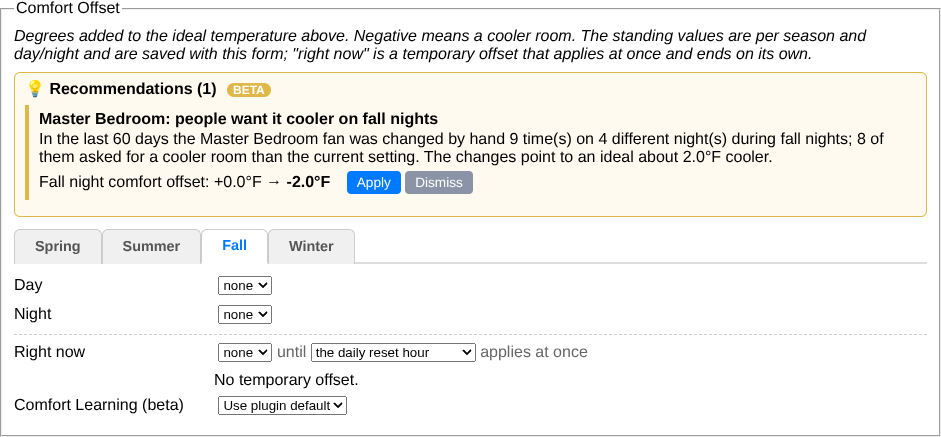
Once a day, at the Daily Reset Hour, the plugin reads the record of manual changes and asks, per zone, season and day/night, what standing comfort offset would have made them unnecessary. It also notices when locks keep ending too early. The result is a recommendation, never a change:
- Standing comfort offset: at least 3 manual changes on 3 different days in the same season and half of the day (for the night half, nights: a change at 03:00 belongs to the night that began the evening before); each day or night weighs the same however many changes it holds; evidence loses half its weight every 21 days; the proposal is the weighted median of what people asked for, in 0.5°F steps within ±3°F.
- Lock rule: when more than 30% of at least 5 lock releases were followed by another manual change within the hour, it recommends holding locks at nighttime (if off) or a lock duration half again as long.
- Nothing is recommended during the first 7 days of records, within 7 days of a change to the same setting, or while a recommendation for that setting is open. A hand edit of a setting dismisses its open recommendation.
- Recommendations appear in the Indigo log, as
open_recommendationson the zone device (trigger a notification from it), as a badge on the Zones list, and on the zone's page with Apply and Dismiss inside the section that owns the setting (comfort offsets in Comfort Offset, lock settings in Lock Behavior); the "right now" strip at the top links to them. Apply writes the setting into the config with an automatic backup and reloads. - Every applied change is watched for 14 days: if the number of days (nights) with manual changes did not fall against the 14 days before, a revert is recommended with the numbers.
- Comfort Learning is set plugin-wide on the Auto Fan page (Suggest or Off) and per zone (Use plugin default, Suggest or Off). Off stops recommendations only: manual changes still lock the fan, set a temporary offset and are recorded. Plugins → Auto Fan → Run comfort learning now and Print open recommendations are there for checking.
Smart Logging
When multiple sensors for a zone update simultaneously, the plugin aggregates all changes within a 1-second window and produces a single consolidated log entry showing everything that changed and the resulting speed decision.
Web Configuration
Browser-based config editor accessible via Indigo's plugin menu (Plugins → Auto Fan → Open Web Configuration) for managing zones, curves, and modifiers.
Installation
- Download the latest release zip
- Double-click to install in Indigo, or copy
Auto Fan.indigoPluginto your Indigo Plugins folder - Enable the plugin in Indigo's plugin menu
License
MIT
| Released on: | Oct. 14, 2026 |
| Requires: | Indigo v2024.2.0+ |
| Downloaded: | 30 times |
| Download this release | |
Highlights
- Manual changes stick for the night. With Hold locks at nighttime (on by default, per-zone override), a fan change made inside the zone's night window holds until the window ends or the house goes Away, instead of reverting after the lock duration.
- Night window per zone and season, used by the nighttime speed limits, night locks and comfort offsets. Existing night hours are moved over from the Nighttime modifier.
- Comfort offsets. A manual change tells the plugin which ideal temperature the person was acting on; it holds that as a temporary offset until the night window ends (or, by day, begins), so automation resumes from their preference. Standing offsets per season and day/night on the zone page; new Indigo actions Set / Clear Comfort Offset.
- Recommendations (beta). Once a day the plugin reviews the manual changes and may recommend a standing comfort offset or a lock setting, shown with its evidence in the section of the zone page it changes. Nothing changes until you click Apply; an applied change is watched for 14 days and an undo is suggested if manual changes didn't drop. Needs 7 days of records and changes on at least 3 different days or nights. Turn Comfort Learning off plugin-wide or per zone if you don't want it.
- Fewer false locks: a fan report that confirms the plugin's own command is never taken for a person (fans that report late, such as Big Ass Fans), and one adjustment reported in pieces counts once.
- Zone page "right now" strip (fan, room, ideal with offsets, lock with Clear); daytime locks extend while presence is detected (up to 10 h); locks and offsets survive restarts and config saves.
Upgrade notes
- Your configuration is migrated on first start; a backup is written to
auto_backups. - Night locks are on by default. For the old behaviour, turn off Hold locks at nighttime on the Auto Fan tab or per zone. Zones without night hours get 22:00–08:00.
- A new
state/folder beside the config holds locks, offsets, the manual-change record (kept 400 days) and recommendations. - Requires Indigo 2024.2 or later (unchanged).
| Released on: | June 11, 2026 |
| Requires: | Indigo v2024.2.0+ |
| Downloaded: | 103 times |
| Download this release | |
New feature
- Optional per-season maximum ideal temperature for the thermostat source: enable the cap in the zone editor and the ideal temperature will never rise above your chosen value (same units as your thermostat, °F or °C). The detailed log explains when the cap is applied.
| Released on: | June 11, 2026 |
| Requires: | Indigo v2024.2.0+ |
| Downloaded: | 105 times |
| Download this release | |
Bug fix
- Thermostat ideal-temperature source now respects HVAC mode: cool-only mode uses the cool setpoint, heat-only the heat setpoint, and auto the midpoint of both. Previously a stale setpoint from the inactive mode skewed the average (e.g. a Nest in cool mode at 73°F still reporting heat 50°F produced an ideal of 61.5°F, driving fans to 100%).
| Released on: | May 6, 2026 |
| Requires: | Indigo v2024.2.0+ |
| Downloaded: | 102 times |
| Download this release | |
Bug fix
- Toggling a fan zone OFF in Indigo now reliably stops the plugin from driving its fan. Previously, saving the zone config in the web editor while a zone was disabled would still apply a new fan speed to it.
| Released on: | March 30, 2026 |
| Requires: | Indigo v2024.2.0+ |
| Downloaded: | 115 times |
| Download this release | |
Auto Fan v2026.1.0 — Initial Release
Smart, automated fan control for Indigo 2025.1. The plugin adjusts fan speeds based on temperature, season, HVAC state, humidity, time of day, and occupancy — all configured through a built-in web editor.
Features
- Per-season fan curves — Four independent fan speed curves (spring, summer, fall, winter) with interactive SVG chart editor, draggable control points, and presets (Linear Ramp, Aggressive Cooling, Gentle Curve, Off Until Hot)
- Per-season ideal temperature — Each season can independently source its ideal temp from a static value, an Indigo variable, or thermostat setpoints
- Season detection — Automatic detection via calendar month with hemisphere support (Northern/Southern), or manual control via an Indigo variable
- HVAC awareness — Boosts fan speed when AC is cooling; adjusts when heating is active
- Humidity boost — Increases fan speed when humidity exceeds a configurable threshold
- Per-season nighttime mode — Quiet hours per season that clamp fan speed to a configured range
- Global presence detection — Uses a home/away Indigo variable to limit fan speed when no one is home
- Zone locking — Lock zones to their current speed for a configurable duration
- Multi-zone support — Independent configuration per fan zone with filtered device selection
- Web-based configuration — Built-in editor for all plugin and zone settings with live fan curve visualization
- Dropdown-based modifiers — Clean 10% increment dropdowns for all speed adjustments
Installation
Download the .indigoPlugin zip from the release assets and double-click to install in Indigo 2025.1.
| Released on: | March 29, 2026 |
| Requires: | Indigo v2024.2.0+ |
| Downloaded: | 100 times |
| Download this release | |
Initial public release of the Auto Fan plugin for Indigo 2025.1.
Features
- Automatic fan speed based on temperature sensors, with per-season fan speed curves (spring, summer, fall, winter)
- Interactive curve editor with drag-and-drop control points and presets (Linear Ramp, Aggressive Cooling, Gentle Curve, Off Until Hot)
- Modifier stack — HVAC cooling/heating adjustments, humidity boost, per-season nighttime clamping, presence detection, and global home/away mode
- Zone locking — manual fan changes pause automation with configurable lock duration and presence-based extension
- Web configuration UI via Indigo's built-in web server
- Multi-sensor support — average multiple temperature/humidity sensors per zone
- Flexible ideal temperature — static value, Indigo variable, or thermostat setpoints