
Mammotion Mower

| Developer: | Glenn's Plugins Like this plugin? Show your appreciation! |
| Category: | Miscellaneous |
| Github: | Github Repo |
| Assistance: | Get help! |
| Plugin ID: | com.GlennNZ.indigoplugin.mammotion |
| Latest release: | v2025.1.50 released on Nov. 10, 2025 |
| Release downloaded: | 60 times |
| Requires: | Indigo v2024.2.0 or higher |
| (Check the Releases tab below for older releases that may have different requirements) | |
| Download latest release |
Mammotion Indigo Plugin

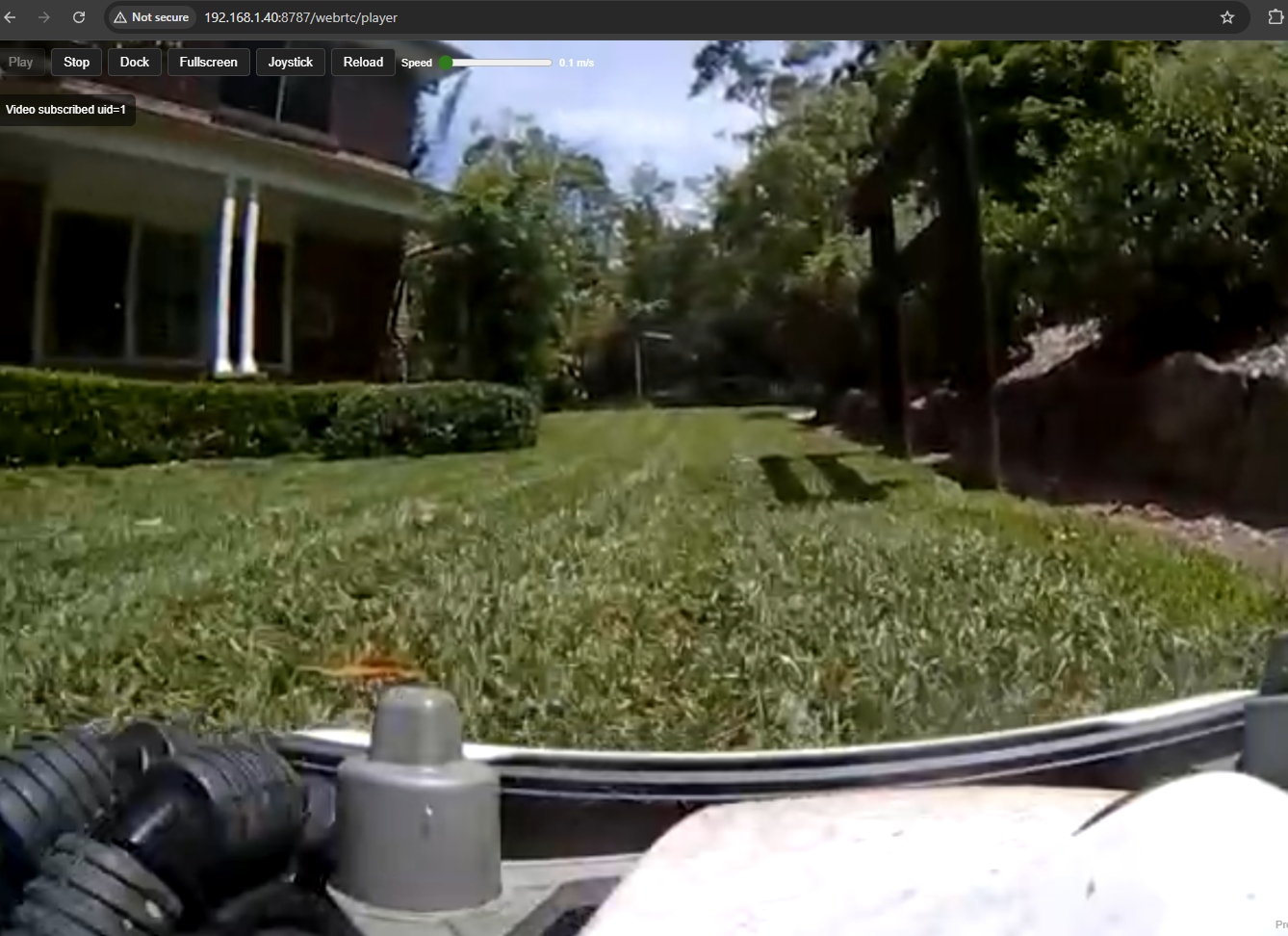
Indigo Domo plugin for Mammotion mowers featuring: - Built‑in WebRTC (Agora) viewer served by the plugin - On‑screen joystick controls (forward/back/left/right with speed) - One‑click Dock command - Human‑readable device states designed for Control Pages, triggers, and conditions - Simple, robust async server and logging setup
Features
- Cloud connectivity via the Mammotion Python libraries
- WebRTC player page (frameless) with:
- Play / Stop
- Fullscreen (button or press “F”)
- Optional camera switch (if multiple tracks are published)
- Optional Joystick overlay with speed slider and safety timeout
- Dock button (return_to_dock)
- Movement pulses:
- Forward/Back send linear speed
- Left/Right send angular speed
- Safety auto‑stop on connection loss
- Indigo‑style logging (Event Log + rotating file log) and a small async HTTP server (aiohttp) running on the plugin’s asyncio loop
- Human‑friendly states (status text, camera/stream info, power/charging, GPS/position, etc.)
Requirements
- Indigo 2024.2 or newer (Python 3.x)
- Network access from your Indigo Server Mac to Mammotion cloud endpoints
- A Mammotion mower that publishes its camera stream to Agora
Installation
- Download or clone this repository.
- Open the Mammation.indigoPlugin bundle to install into Indigo.
- Enable the plugin in Indigo (Plugins menu).
- Configure your Mammotion account details in the device or plugin configuration.
WebRTC Viewer
- Player URL:
- http://YOUR‑INDIGO‑HOST:8787/webrtc/player
- Auto‑show joystick: http://YOUR‑INDIGO‑HOST:8787/webrtc/player?joystick=1
- Endpoints (for reference):
- POST /webrtc/start — join channel and fetch tokens
- POST /webrtc/stop — leave channel and clear tokens
- GET /webrtc/tokens.json — current token bundle (debug)
- GET /webrtc/player — HTML player
- POST /webrtc/move — one‑shot move {dir: up|down|left|right, speed: float}
- POST /webrtc/move_hold — begin continuous move (server/client safety‑limited)
- POST /webrtc/move_release — stop continuous move
- POST /webrtc/dock — return_to_dock
Notes - Use the Joystick button to toggle overlay. Hold a direction for continuous motion (auto‑stops after ~10s or on release). - Preferred camera and joystick speed persist in localStorage.
Indigo Actions and Commands
Movement (Action Group actions, each takes a speed float 0.1–1.0): - Move Forward — sends move_forward(linear=speed) - Move Back — sends move_back(linear=speed) - Move Left — sends move_left(angular=speed) - Move Right — sends move_right(angular=speed)
Dock: - Return to Dock — sends return_to_dock - Also available as the Dock button in the WebRTC viewer.
Stream control (from viewer page): - Play — refresh subscription, join channel, return tokens - Stop — leave channel, clear tokens
Tips - Some mower firmwares ignore very low speeds; try 0.4–0.8 for testing. - Movement pulses deliberately skip heavy sync/map refresh to keep the queue responsive. - Movements are ignored by firmware in non‑interactive modes (docked/charging/locked).
Device States (accessible in Indigo)
Connection and Stream - connected (bool) - status_text (string) - last_update (string) - stream_status (string) - stream_app_id (string) - stream_channel (string) - stream_uid (string) - stream_expire (int)
Mower Status - onOffState (bool) - mowing (bool) - docked (bool) - charging (bool) - error_text (string) - model_name (string) - fw_version (string) - work_mode (string/enum) - speed_mode (string/enum) - state_summary (string)
Power / Blades - battery_percent (number) - blades_on (bool) - blade_rpm (int) - blade_height_mm (int) - blade_mode (string)
Position / GPS (when available) - pos_x (number) - pos_y (number) - pos_type (int) - pos_level (int) - toward (int) - gps_lat (float) - gps_lon (float)
Environment / Radio - rain_detected (bool) - wifi_rssi (int) - satellites_total (int) - satellites_l2 (int)
Zones / Areas - zone_hash (int) - area_name (string)
Notes - State availability varies by model/firmware and connection mode.
Security
The viewer is served over plain HTTP for LAN use. If exposing externally, use an authenticated reverse proxy with TLS.
Troubleshooting
- Tokens but no video: Press Play, wait up to ~15s for a publisher. Try Stop then Play.
- Movement logs but no motion:
- Try a higher speed (0.6–0.8).
- Ensure the mower isn’t docked/locked/returning.
- Confirm forward/back use linear and left/right use angular (this plugin does).
- Connection loss: Movement auto‑stops. Press Play to reconnect.
Credits
- Many thanks to the authors and maintainers of the Mammotion Python libraries used by this plugin.
License
MIT (see LICENSE)
| v2025.1.50 | Requires Indigo v2024.2.0+ | Released Nov. 10, 2025 | Allow Complex Mowing Tasks, fix login, auto login to cloud when stale |
| Released on: | Nov. 10, 2025 |
| Requires: | Indigo v2024.2.0+ |
| Downloaded: | 60 times |
| Download this release | |
Mammotion Indigo Plugin
Indigo Domo plugin for Mammotion mowers featuring: - Built‑in WebRTC (Agora) viewer served by the plugin - On‑screen joystick controls (forward/back/left/right with speed) - One‑click Dock command - Human‑readable device states designed for Control Pages, triggers, and conditions - Simple, robust async server and logging setup
Features
- Cloud connectivity via the Mammotion Python libraries
- WebRTC player page (frameless) with:
- Play / Stop
- Fullscreen (button or press “F”)
- Optional camera switch (if multiple tracks are published)
- Optional Joystick overlay with speed slider and safety timeout
- Dock button (return_to_dock)
- Movement pulses:
- Forward/Back send linear speed
- Left/Right send angular speed
- Safety auto‑stop on connection loss
- Indigo‑style logging (Event Log + rotating file log) and a small async HTTP server (aiohttp) running on the plugin’s asyncio loop
- Human‑friendly states (status text, camera/stream info, power/charging, GPS/position, etc.)
Requirements
- Indigo 2024.2 or newer (Python 3.x)
- Network access from your Indigo Server Mac to Mammotion cloud endpoints
- A Mammotion mower that publishes its camera stream to Agora
Installation
- Download or clone this repository.
- Open the Mammation.indigoPlugin bundle to install into Indigo.
- Enable the plugin in Indigo (Plugins menu).
- Configure your Mammotion account details in the device or plugin configuration.
WebRTC Viewer
- Player URL:
- http://YOUR‑INDIGO‑HOST:8787/webrtc/player
- Auto‑show joystick: http://YOUR‑INDIGO‑HOST:8787/webrtc/player?joystick=1
- Endpoints (for reference):
- POST /webrtc/start — join channel and fetch tokens
- POST /webrtc/stop — leave channel and clear tokens
- GET /webrtc/tokens.json — current token bundle (debug)
- GET /webrtc/player — HTML player
- POST /webrtc/move — one‑shot move {dir: up|down|left|right, speed: float}
- POST /webrtc/move_hold — begin continuous move (server/client safety‑limited)
- POST /webrtc/move_release — stop continuous move
- POST /webrtc/dock — return_to_dock
Notes - Use the Joystick button to toggle overlay. Hold a direction for continuous motion (auto‑stops after ~10s or on release). - Preferred camera and joystick speed persist in localStorage.
Indigo Actions and Commands
Movement (Action Group actions, each takes a speed float 0.1–1.0): - Move Forward — sends move_forward(linear=speed) - Move Back — sends move_back(linear=speed) - Move Left — sends move_left(angular=speed) - Move Right — sends move_right(angular=speed)
Dock: - Return to Dock — sends return_to_dock - Also available as the Dock button in the WebRTC viewer.
Stream control (from viewer page): - Play — refresh subscription, join channel, return tokens - Stop — leave channel, clear tokens
Tips - Some mower firmwares ignore very low speeds; try 0.4–0.8 for testing. - Movement pulses deliberately skip heavy sync/map refresh to keep the queue responsive. - Movements are ignored by firmware in non‑interactive modes (docked/charging/locked).
Device States (accessible in Indigo)
Connection and Stream - connected (bool) - status_text (string) - last_update (string) - stream_status (string) - stream_app_id (string) - stream_channel (string) - stream_uid (string) - stream_expire (int)
Mower Status - onOffState (bool) - mowing (bool) - docked (bool) - charging (bool) - error_text (string) - model_name (string) - fw_version (string) - work_mode (string/enum) - speed_mode (string/enum) - state_summary (string)
Power / Blades - battery_percent (number) - blades_on (bool) - blade_rpm (int) - blade_height_mm (int) - blade_mode (string)
Position / GPS (when available) - pos_x (number) - pos_y (number) - pos_type (int) - pos_level (int) - toward (int) - gps_lat (float) - gps_lon (float)
Environment / Radio - rain_detected (bool) - wifi_rssi (int) - satellites_total (int) - satellites_l2 (int)
Zones / Areas - zone_hash (int) - area_name (string)
Notes - State availability varies by model/firmware and connection mode.
Security
The viewer is served over plain HTTP for LAN use. If exposing externally, use an authenticated reverse proxy with TLS.
Troubleshooting
- Tokens but no video: Press Play, wait up to ~15s for a publisher. Try Stop then Play.
- Movement logs but no motion:
- Try a higher speed (0.6–0.8).
- Ensure the mower isn’t docked/locked/returning.
- Confirm forward/back use linear and left/right use angular (this plugin does).
- Connection loss: Movement auto‑stops. Press Play to reconnect.
Credits
- Many thanks to the authors and maintainers of the Mammotion Python libraries used by this plugin.
License
MIT (see LICENSE)
| v2025.1.25 | Requires Indigo v2024.2.0+ | Released Nov. 7, 2025 | 2025.1.25 Mammotion Robot Lawn Mower Plugin |
| Released on: | Nov. 7, 2025 |
| Requires: | Indigo v2024.2.0+ |
| Downloaded: | 49 times |
| Download this release | |
Mammotion Indigo Plugin
Indigo Domo plugin for Mammotion mowers featuring: - Built‑in WebRTC (Agora) viewer served by the plugin - On‑screen joystick controls (forward/back/left/right with speed) - One‑click Dock command - Human‑readable device states designed for Control Pages, triggers, and conditions - Simple, robust async server and logging setup
Features
- Cloud connectivity via the Mammotion Python libraries
- WebRTC player page (frameless) with:
- Play / Stop
- Fullscreen (button or press “F”)
- Optional camera switch (if multiple tracks are published)
- Optional Joystick overlay with speed slider and safety timeout
- Dock button (return_to_dock)
- Movement pulses:
- Forward/Back send linear speed
- Left/Right send angular speed
- Safety auto‑stop on connection loss
- Indigo‑style logging (Event Log + rotating file log) and a small async HTTP server (aiohttp) running on the plugin’s asyncio loop
- Human‑friendly states (status text, camera/stream info, power/charging, GPS/position, etc.)
Requirements
- Indigo 2024.2 or newer (Python 3.x)
- Network access from your Indigo Server Mac to Mammotion cloud endpoints
- A Mammotion mower that publishes its camera stream to Agora
Installation
- Download or clone this repository.
- Open the Mammation.indigoPlugin bundle to install into Indigo.
- Enable the plugin in Indigo (Plugins menu).
- Configure your Mammotion account details in the device or plugin configuration.
WebRTC Viewer
- Player URL:
- http://YOUR‑INDIGO‑HOST:8787/webrtc/player
- Auto‑show joystick: http://YOUR‑INDIGO‑HOST:8787/webrtc/player?joystick=1
- Endpoints (for reference):
- POST /webrtc/start — join channel and fetch tokens
- POST /webrtc/stop — leave channel and clear tokens
- GET /webrtc/tokens.json — current token bundle (debug)
- GET /webrtc/player — HTML player
- POST /webrtc/move — one‑shot move {dir: up|down|left|right, speed: float}
- POST /webrtc/move_hold — begin continuous move (server/client safety‑limited)
- POST /webrtc/move_release — stop continuous move
- POST /webrtc/dock — return_to_dock
Notes - Use the Joystick button to toggle overlay. Hold a direction for continuous motion (auto‑stops after ~10s or on release). - Preferred camera and joystick speed persist in localStorage.
Indigo Actions and Commands
Movement (Action Group actions, each takes a speed float 0.1–1.0): - Move Forward — sends move_forward(linear=speed) - Move Back — sends move_back(linear=speed) - Move Left — sends move_left(angular=speed) - Move Right — sends move_right(angular=speed)
Dock: - Return to Dock — sends return_to_dock - Also available as the Dock button in the WebRTC viewer.
Stream control (from viewer page): - Play — refresh subscription, join channel, return tokens - Stop — leave channel, clear tokens
Tips - Some mower firmwares ignore very low speeds; try 0.4–0.8 for testing. - Movement pulses deliberately skip heavy sync/map refresh to keep the queue responsive. - Movements are ignored by firmware in non‑interactive modes (docked/charging/locked).
Device States (accessible in Indigo)
Connection and Stream - connected (bool) - status_text (string) - last_update (string) - stream_status (string) - stream_app_id (string) - stream_channel (string) - stream_uid (string) - stream_expire (int)
Mower Status - onOffState (bool) - mowing (bool) - docked (bool) - charging (bool) - error_text (string) - model_name (string) - fw_version (string) - work_mode (string/enum) - speed_mode (string/enum) - state_summary (string)
Power / Blades - battery_percent (number) - blades_on (bool) - blade_rpm (int) - blade_height_mm (int) - blade_mode (string)
Position / GPS (when available) - pos_x (number) - pos_y (number) - pos_type (int) - pos_level (int) - toward (int) - gps_lat (float) - gps_lon (float)
Environment / Radio - rain_detected (bool) - wifi_rssi (int) - satellites_total (int) - satellites_l2 (int)
Zones / Areas - zone_hash (int) - area_name (string)
Notes - State availability varies by model/firmware and connection mode.
Security
The viewer is served over plain HTTP for LAN use. If exposing externally, use an authenticated reverse proxy with TLS.
Troubleshooting
- Tokens but no video: Press Play, wait up to ~15s for a publisher. Try Stop then Play.
- Movement logs but no motion:
- Try a higher speed (0.6–0.8).
- Ensure the mower isn’t docked/locked/returning.
- Confirm forward/back use linear and left/right use angular (this plugin does).
- Connection loss: Movement auto‑stops. Press Play to reconnect.
Credits
- Many thanks to the authors and maintainers of the Mammotion Python libraries used by this plugin.
License
MIT (see LICENSE)